🎉 Get 50% discount on All Access plans. Ends in

00
Day
:
00
Hr
:
00
Min
:
00
Sec

🎉 Get 50% discount on All Access plans. Ends in

00
Day
:
00
Hr
:
00
Min
:
00
Sec

Framer vs WordPress: Which is Better for Designers in 2026?

Last Updated on:

Feb 6, 2026

Feb 6, 2026

Feb 6, 2026

Feb 6, 2026

Author:

Framerbite

Framerbite

Framerbite

Framerbite

framer vs wordpress
framer vs wordpress
framer vs wordpress
framer vs wordpress

There are so many different ways to build a website today and choosing the right one can be confusing. WordPress and Framer are two of the most popular CMS. They both help you create websites, but they work in very different ways.

In 2026, the web design environment will be very different. Designers want tools that are smooth, fast, and let their creativity flow without technical hassle. Nobody wants to waste hours fixing broken plugins or wrestling with clunky dashboards. A beautiful and quick implementation of your ideas is what you want.

This guide is for designers, freelancers, creative teams, and small agencies who want to choose the best CMS for their needs. It will save you time and frustration to know the pros and cons of Framer and WordPress before building a client's site.

What is Framer?

framer website preview

Framer was originally made for collaborative design to create interactive presentations. In time, Framer became into a powerful tool for creating and publishing websites. Today, you can design entire websites, add animations, and publish live sites without writing any code.

If you’re familiar with Figma or Sketch, Framer feels similar. Framer is different because your design becomes your website. It is exactly what visitors will see on the web that you see on the canvas. It is faster as an outcome.

Key Features of Framer

  • Simple Design Process: Drag, drop, and customize every element on a blank canvas, with no coding required.

  • No-Code Animations: Add smooth scroll effects, button hovers, slides, and other interactions with just clicks.

  • Modern CMS: Add blog posts, case studies, or dynamic content with a simple content management system built right in.

  • Built-In Hosting: You can publish your site directly to Framer's fast, secure hosting without the need for external setup.

  • Responsive Design: Create websites that are easy to use on mobiles, tablets, and desktops.

  • Templates and Components: Save time by using templates or pre-built components.

  • Collaborative: Communicate real-time updates and feedback with your team members.

Who Uses Framer?

Framer is especially popular for designers, small creative teams, startups, and agencies. There are many freelancers who use it because it allows them to design, build, and launch sites without having to hire a developer.

Startups appreciate Framer for its design, creative freedom and client-friendly previews to get landing pages and portfolios online.

Why is Framer Popular in Modern Web Design?

Designers love Framer because it feels like it was made for them. They can build real websites themselves without hiring developers. It is easy, fast, and provides visual control at every step.

Code is no longer held up during development or design details are lost. Framer’s all-in-one approach means fewer headaches, faster launches, and better client satisfaction. Framer sites look modern, polished, and unique, unlike cookie-cutter templates.

What is WordPress?
wordpress backend preview

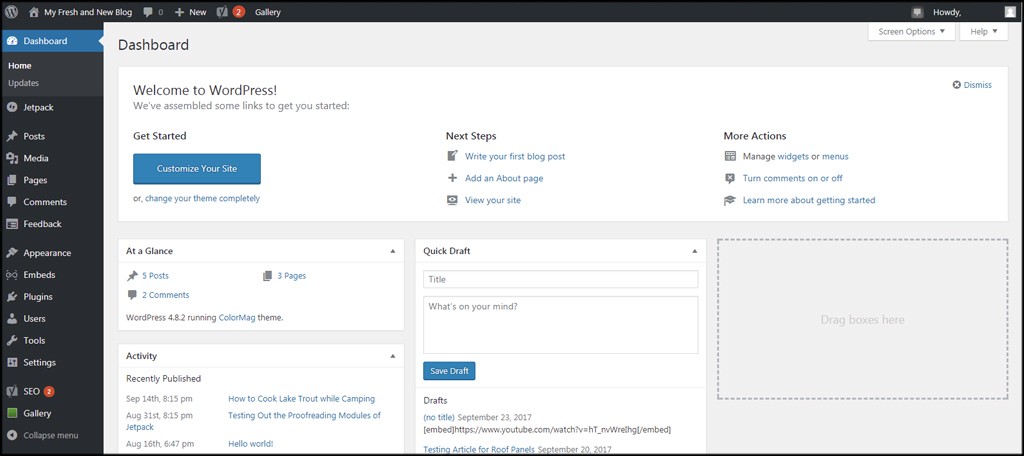
Let's talk about WordPress now. WordPress was created back in 2003 as a simple blogging platform. Over the years, WordPress has become the world’s most popular content management system (CMS). Today, WordPress powers over 40% of all websites, from small blogs to large news platforms.

WordPress is not a visual design tool, it's a powerful system for organizing, managing, and publishing content. It's easy to set up on your own hosting, choose a theme, and add extra features with plugins.

Key Features of WordPress

  • Open Source: Wordpress CMS is totally free to download and use.

  • Themes: You can choose from thousands of free and paid themes to change the look of your site instantly.

  • Plugins: There are over 50,000 plugins to add almost any feature - SEO, e-commerce, security, backups, etc.

  • Flexible CMS: Easily manage thousands of pages, posts, categories, and users.

  • SEO Friendly: Use plugins like Yoast SEO or Rank Math to rank higher in Google.

  • Flexible: Customize anywhere from simple blogs to large e-commerce sites.

  • Huge Community: Worldwide support, tutorials and updates are available.

How WordPress Works as a CMS

In WordPress, all your website's content is organized and stored in a central dashboard. You create pages, posts, categories, menus, and even user accounts. This makes it great for websites that have lots of information and need frequent updates, such as blogs, news sites, or online stores.

You customize the look and feel by picking a theme. And you add functionality by installing plugins. Many plugins are free, but some are premium or require development skills to set up.

Who Uses WordPress?

If you ask who uses WordPress, the answer is almost everyone. Bloggers, small businesses, and huge publishers like BBC, TechCrunch, and The New Yorker depend on WordPress. Using WooCommerce, one of the best e-commerce plugins, it's also very popular.

Why is WordPress Still Trusted for Content-Heavy Sites?

WordPress’s strength lies in managing lots of content easily. It lets multiple authors post, edit, and schedule content. It supports complex taxonomies like tags and categories, which help organize vast amounts of posts and pages.

It is reliable and scalable, thanks to the huge plugin ecosystem, which enables SEO tools, performance optimizations, and security layers to be added. If you want a solid, proven system with a large support network, WordPress delivers.

Framer and WordPress Differences in 2026
difference between framer and wordpress

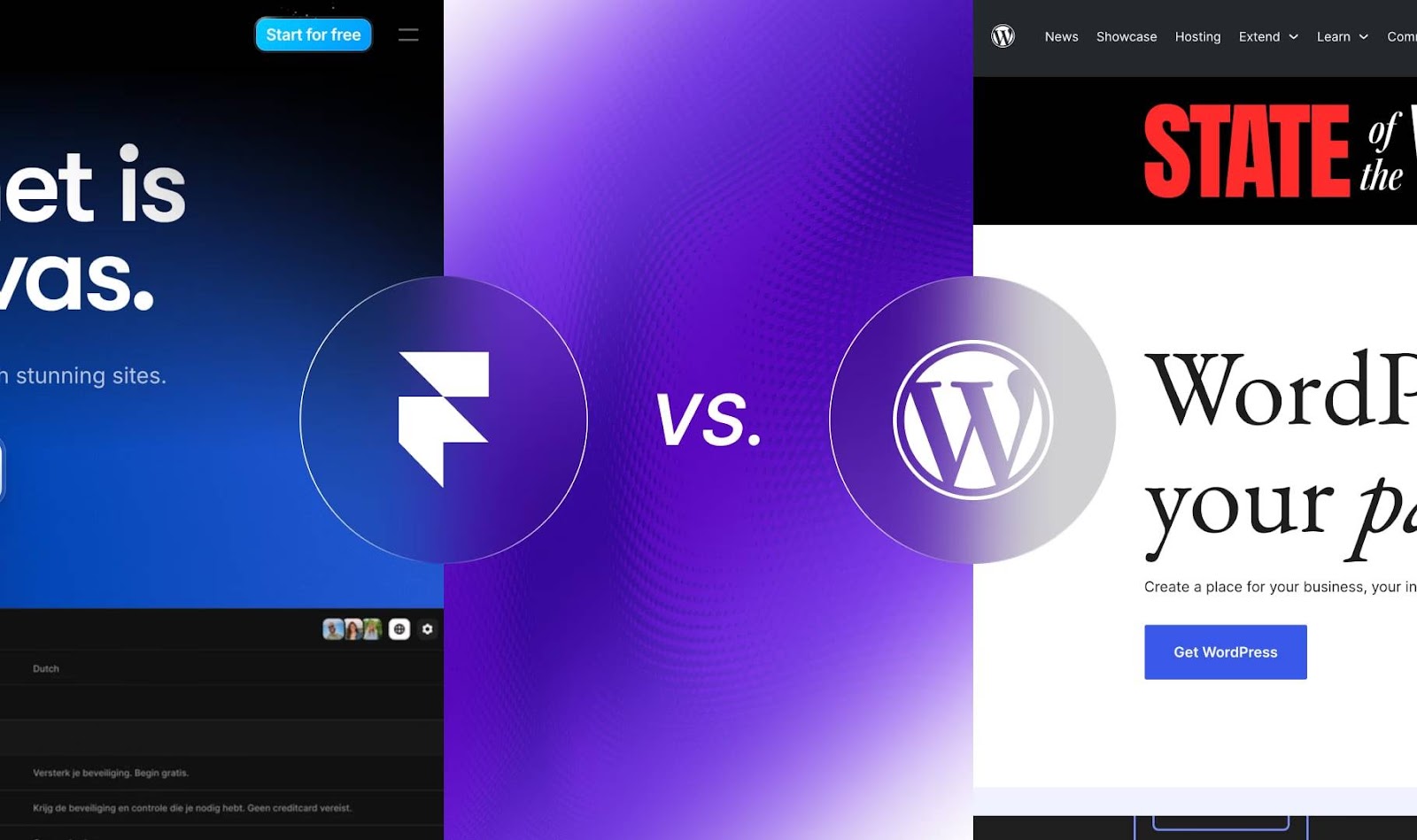
Here are the main differences between these two tools so you can choose the right one for you.

Framer vs WordPress- Setup & Hosting

  • Framer: Hosting is included with Framer. You can design and publish - no server or domain configurations needed. This saves time and reduces technical hassle.

  • WordPress: To install WordPress, you must find and pay for your own hosting provider like Bluehost, SiteGround, or WP Engine. You need to install WordPress and manage updates, backups, and security yourself or hire a developer.

Framer vs WordPress- Ease of Use

  • Framer: Framer is a super simple tool for designers. There is no need for coding, you get exactly what you see, and the learning method is gentle.

  • WordPress: Easy for beginners to create simple blogs. But complexity grows fast when you add plugins, themes, or want to customize deeply. Sometimes you’ll need help from developers or page builder plugins.

Framer vs WordPress- Design Flexibility

  • Framer: In Framer, you can create anything you want - from scratch or edit templates to the tiniest details. Themes are not locked in.

  • WordPress: Themes provide a base style, but big design changes often require custom coding or page builders like Elementor, which can add complexity and bloat.

Framer vs WordPress- Plugins & Extensibility

  • Framer: No third-party plugins in Framer. There are built-in features animations, CMS, hosting, which reduce maintenance and potential issues.

  • WordPress: A large plugin library offers a virtually limitless number of features. Your site can be slowed down and become incompatible if you use too many plugins.

Framer vs WordPress- SEO Capabilities

  • Framer: Framer includes all SEO features such as meta tags, clean code, fast loading, and sitemaps. It should be sufficient for most small and medium-sized sites.

  • WordPress: You can optimize every detail of your content and site structure with powerful SEO plugins Yoast and Rank Math. So, WordPress is ideal for large blogs and e-commerce sites.

Framer vs WordPress- Cost

  • Framer: The fee for Framer is a monthly subscription fee, which includes hosting and updates. As teams and sites grow, costs increase.

  • WordPress: Open-source software with a free core, but you need to pay for hosting, premium themes, plugins, security, and sometimes developer support. It depends on your needs how much it will cost.

Framer vs WordPress Features Comparison

Framer: Framer focuses on designer-friendly tools like drag-and-drop editing, built-in CMS for dynamic content, and no-code animations, making it ideal for quick, pixel-perfect sites. 

WordPress: WordPress offers different plugins like Yoast for SEO, Elementor for builders, themes, and backend extensibility, but often need more setup for advanced features.

Framer vs WordPress Interactive Design Comparison

Framer: Framer excels in interactive design with native scroll-triggered animations, hover effects, and smooth transitions that require no code, delivering fluid experiences right from its visual canvas. 

WordPress: In contrast, WordPress depends on plugins like Lottie or custom CSS/JS for similar effects, which can bloat site performance and complicate maintenance. WordPress user interactions rely heavily on themes and plugins, resulting in less fluid outcomes unless custom dev work is involved.

Framer vs WordPress Website Design Comparison

Framer: Framer provides a blank canvas with full pixel control and default responsiveness for ultimate flexibility. Framer ensures fast loads via optimized code, no plugin drag; WordPress slows with heavy customizations.

WordPress: WordPress feels theme-locked, with builders like Breakdance adding freedom but extra complexity. It is customizable but fights template limits without code. 

Framer vs WordPress Wireframing Comparison

Framer: Framer integrates wireframing into its visual editor, allowing instant transitions to interactive prototypes and live sites, perfect for your beginner tutorials. 

WordPress: WordPress lacks native wireframing; it uses external tools like Figma before theme import, slowing workflows.

Advantages of Using Framer
framer's easy features and advantages

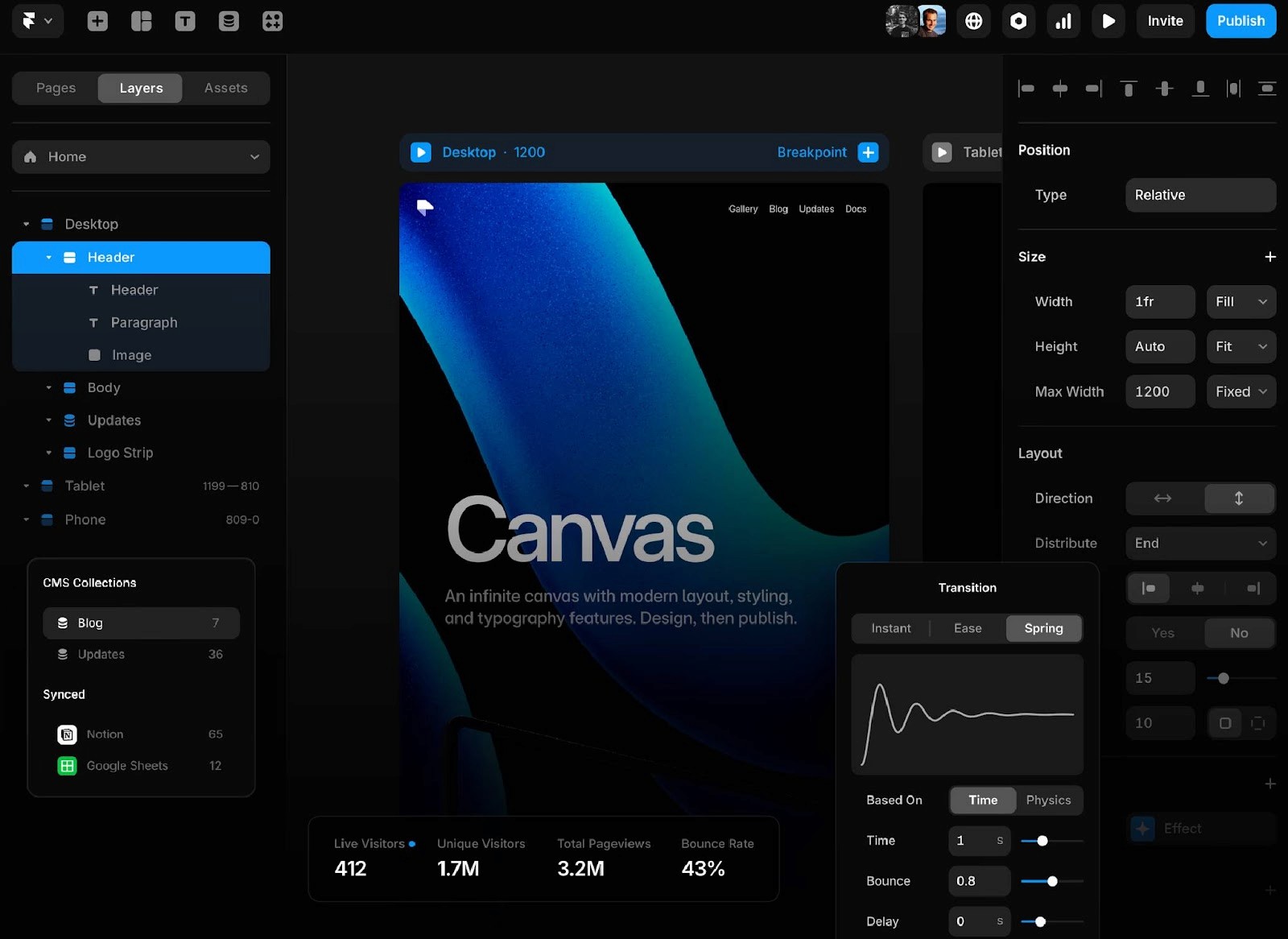
What makes Framer so popular with designers? Here are some strong points.

Visual-First Design Process

Framer was built for designers. You can customize layout, typography, colors, and spacing visually by dragging and dropping elements. A developer or coder does not have to back and forth with you.

Easy Animations & Actions

Modern websites feel alive with animations. Framer lets you add smooth scroll effects, hover animations, fades, and slides with simple controls. You don’t need to write or debug code.

Built-In Hosting & Publishing

No need to set up external hosting or worry about technical maintenance. Hit Publish, and your site is live on Framer’s fast servers. This is a huge time saver.

Modern CMS for Simple Content

Framer’s CMS is growing. Blog posts, portfolio items, and team pages can be managed easily without plugins. It covers all content requirements for many sites.

Best for Portfolios, Landing Pages, Startups

Framer shines when you want a modern, unique site fast. Framer vs WordPress for landing pages, also it’s perfect for:

  • Personal portfolios

  • Creative agencies

  • Startup landing pages

  • Event sites

  • Simple product or service websites

Advantages of WordPress

WordPress has been the web’s backbone for decades. Here’s why it remains popular.

Strong CMS for Heavy Content

WordPress handles thousands of posts, multiple authors, and complex categories effortlessly. Its backend tools are designed for large-scale content.

Huge Plugin and Theme Ecosystem

SEO, social media sharing, forms, memberships, backups, security, and e-commerce - all plugins exist. Similarly, there is a huge theme market.

Flexible for E-Commerce, Blogs, News Sites

WordPress powers massive news websites, magazines, and big online stores. Using WooCommerce, you can create a fully functional online store.

Big Developer Community

Custom themes and plugins are built by a large community of developers. There is a lot of guidance available for special features and design tweaks.

Scales Well for Large Sites

WordPress can handle millions of visitors with proper hosting and optimization. This makes it a go-to for enterprise websites.

What Are the Limitations of Framer and WordPress?
limitations of framer and wordpress

Every tool has its downsides. Let’s be honest about what you might face.

Framer Limitations

  • Growing your team or sites can lead to expensive subscriptions.

  • It's not a good fit for massive blogs or sites with thousands of posts.

  • Framer's SEO features are good, but fewer than those in WordPress advanced plugins.

WordPress Limitations

  • WordPress core, plugins, and themes need to be updated regularly. There are security risks associated with forgetting to update.

  • You can create conflicts and slow down your site if you install too many plugins.

  • Coding or paid page builders are usually needed for major design changes.

Which One Should You Choose?

You can choose Framer if you wish:

  • Full creative control

  • Fast, no-code design and publishing

  • Built-in hosting and CMS for smaller sites

  • Modern animations and interactions

WordPress is a good choice if you need:

  • Powerful content management for large blogs or news sites

  • Huge plugin ecosystem

  • Robust e-commerce options

  • Custom development support

You should also consider your budget and the skill level of your team. Framer's monthly costs are clear, but they can add up. It may seem cheap, but WordPress often requires hosting and developers.

Framer vs WordPress FAQs

Framer vs WordPress- which should I use?

Use Framer for quick, visual designs like landing pages. Go with WordPress for blogs or online stores.

Framer vs WordPress- which is better?

Framer is better for pretty, fast sites. WordPress is better for big content sites.

Is Framer good for SEO compared to WordPress?

Framer offers solid built-in SEO tools and fast performance but lacks WordPress's advanced plugins like Yoast; it's sufficient for design-focused sites, pair with external audits for e-commerce.

What's the cost difference between Framer and WordPress?

Framer's plans start at $5/month with hosting included; WordPress is free but adds hosting ($3-20/month) and premium plugins/themes ($50-200/year).

Can I use Framer and WordPress together?

Yes, add Framer designs to WordPress pages easily.

Conclusion

Designers, developers, and business owners can choose between Framer and WordPress depending on their needs. In terms of modern, fast, and clean, visual design, Framer is a great choice. Designers can design and publish from the same place without touching any code.

On the other hand, if you need a flexible system with thousands of plugins, themes, and a huge support community, WordPress is the best choice. It’s ideal for blogs, large sites, and projects that may grow and need more complex features later.

As a result, both platforms are powerful in their own right. You should select the one that matches your abilities, your project needs, and how much time you want to spend managing your site.

There are so many different ways to build a website today and choosing the right one can be confusing. WordPress and Framer are two of the most popular CMS. They both help you create websites, but they work in very different ways.

In 2026, the web design environment will be very different. Designers want tools that are smooth, fast, and let their creativity flow without technical hassle. Nobody wants to waste hours fixing broken plugins or wrestling with clunky dashboards. A beautiful and quick implementation of your ideas is what you want.

This guide is for designers, freelancers, creative teams, and small agencies who want to choose the best CMS for their needs. It will save you time and frustration to know the pros and cons of Framer and WordPress before building a client's site.

What is Framer?

framer website preview

Framer was originally made for collaborative design to create interactive presentations. In time, Framer became into a powerful tool for creating and publishing websites. Today, you can design entire websites, add animations, and publish live sites without writing any code.

If you’re familiar with Figma or Sketch, Framer feels similar. Framer is different because your design becomes your website. It is exactly what visitors will see on the web that you see on the canvas. It is faster as an outcome.

Key Features of Framer

  • Simple Design Process: Drag, drop, and customize every element on a blank canvas, with no coding required.

  • No-Code Animations: Add smooth scroll effects, button hovers, slides, and other interactions with just clicks.

  • Modern CMS: Add blog posts, case studies, or dynamic content with a simple content management system built right in.

  • Built-In Hosting: You can publish your site directly to Framer's fast, secure hosting without the need for external setup.

  • Responsive Design: Create websites that are easy to use on mobiles, tablets, and desktops.

  • Templates and Components: Save time by using templates or pre-built components.

  • Collaborative: Communicate real-time updates and feedback with your team members.

Who Uses Framer?

Framer is especially popular for designers, small creative teams, startups, and agencies. There are many freelancers who use it because it allows them to design, build, and launch sites without having to hire a developer.

Startups appreciate Framer for its design, creative freedom and client-friendly previews to get landing pages and portfolios online.

Why is Framer Popular in Modern Web Design?

Designers love Framer because it feels like it was made for them. They can build real websites themselves without hiring developers. It is easy, fast, and provides visual control at every step.

Code is no longer held up during development or design details are lost. Framer’s all-in-one approach means fewer headaches, faster launches, and better client satisfaction. Framer sites look modern, polished, and unique, unlike cookie-cutter templates.

What is WordPress?

wordpress backend preview

Let's talk about WordPress now. WordPress was created back in 2003 as a simple blogging platform. Over the years, WordPress has become the world’s most popular content management system (CMS). Today, WordPress powers over 40% of all websites, from small blogs to large news platforms.

WordPress is not a visual design tool, it's a powerful system for organizing, managing, and publishing content. It's easy to set up on your own hosting, choose a theme, and add extra features with plugins.

Key Features of WordPress

  • Open Source: Wordpress CMS is totally free to download and use.

  • Themes: You can choose from thousands of free and paid themes to change the look of your site instantly.

  • Plugins: There are over 50,000 plugins to add almost any feature - SEO, e-commerce, security, backups, etc.

  • Flexible CMS: Easily manage thousands of pages, posts, categories, and users.

  • SEO Friendly: Use plugins like Yoast SEO or Rank Math to rank higher in Google.

  • Flexible: Customize anywhere from simple blogs to large e-commerce sites.

  • Huge Community: Worldwide support, tutorials and updates are available.

How WordPress Works as a CMS

In WordPress, all your website's content is organized and stored in a central dashboard. You create pages, posts, categories, menus, and even user accounts. This makes it great for websites that have lots of information and need frequent updates, such as blogs, news sites, or online stores.

You customize the look and feel by picking a theme. And you add functionality by installing plugins. Many plugins are free, but some are premium or require development skills to set up.

Who Uses WordPress?

If you ask who uses WordPress, the answer is almost everyone. Bloggers, small businesses, and huge publishers like BBC, TechCrunch, and The New Yorker depend on WordPress. Using WooCommerce, one of the best e-commerce plugins, it's also very popular.

Why is WordPress Still Trusted for Content-Heavy Sites?

WordPress’s strength lies in managing lots of content easily. It lets multiple authors post, edit, and schedule content. It supports complex taxonomies like tags and categories, which help organize vast amounts of posts and pages.

It is reliable and scalable, thanks to the huge plugin ecosystem, which enables SEO tools, performance optimizations, and security layers to be added. If you want a solid, proven system with a large support network, WordPress delivers.

Framer and WordPress Differences in 2026

difference between framer and wordpress

Here are the main differences between these two tools so you can choose the right one for you.

Framer vs WordPress- Setup & Hosting

  • Framer: Hosting is included with Framer. You can design and publish - no server or domain configurations needed. This saves time and reduces technical hassle.

  • WordPress: To install WordPress, you must find and pay for your own hosting provider like Bluehost, SiteGround, or WP Engine. You need to install WordPress and manage updates, backups, and security yourself or hire a developer.

Framer vs WordPress- Ease of Use

  • Framer: Framer is a super simple tool for designers. There is no need for coding, you get exactly what you see, and the learning method is gentle.

  • WordPress: Easy for beginners to create simple blogs. But complexity grows fast when you add plugins, themes, or want to customize deeply. Sometimes you’ll need help from developers or page builder plugins.

Framer vs WordPress- Design Flexibility

  • Framer: In Framer, you can create anything you want - from scratch or edit templates to the tiniest details. Themes are not locked in.

  • WordPress: Themes provide a base style, but big design changes often require custom coding or page builders like Elementor, which can add complexity and bloat.

Framer vs WordPress- Plugins & Extensibility

  • Framer: No third-party plugins in Framer. There are built-in features animations, CMS, hosting, which reduce maintenance and potential issues.

  • WordPress: A large plugin library offers a virtually limitless number of features. Your site can be slowed down and become incompatible if you use too many plugins.

Framer vs WordPress- SEO Capabilities

  • Framer: Framer includes all SEO features such as meta tags, clean code, fast loading, and sitemaps. It should be sufficient for most small and medium-sized sites.

  • WordPress: You can optimize every detail of your content and site structure with powerful SEO plugins Yoast and Rank Math. So, WordPress is ideal for large blogs and e-commerce sites.

Framer vs WordPress- Cost

  • Framer: The fee for Framer is a monthly subscription fee, which includes hosting and updates. As teams and sites grow, costs increase.

  • WordPress: Open-source software with a free core, but you need to pay for hosting, premium themes, plugins, security, and sometimes developer support. It depends on your needs how much it will cost.

Framer vs WordPress Features Comparison

Framer: Framer focuses on designer-friendly tools like drag-and-drop editing, built-in CMS for dynamic content, and no-code animations, making it ideal for quick, pixel-perfect sites. 

WordPress: WordPress offers different plugins like Yoast for SEO, Elementor for builders, themes, and backend extensibility, but often need more setup for advanced features.

Framer vs WordPress Interactive Design Comparison

Framer: Framer excels in interactive design with native scroll-triggered animations, hover effects, and smooth transitions that require no code, delivering fluid experiences right from its visual canvas. 

WordPress: In contrast, WordPress depends on plugins like Lottie or custom CSS/JS for similar effects, which can bloat site performance and complicate maintenance. WordPress user interactions rely heavily on themes and plugins, resulting in less fluid outcomes unless custom dev work is involved.

Framer vs WordPress Website Design Comparison

Framer: Framer provides a blank canvas with full pixel control and default responsiveness for ultimate flexibility. Framer ensures fast loads via optimized code, no plugin drag; WordPress slows with heavy customizations.

WordPress: WordPress feels theme-locked, with builders like Breakdance adding freedom but extra complexity. It is customizable but fights template limits without code. 

Framer vs WordPress Wireframing Comparison

Framer: Framer integrates wireframing into its visual editor, allowing instant transitions to interactive prototypes and live sites, perfect for your beginner tutorials. 

WordPress: WordPress lacks native wireframing; it uses external tools like Figma before theme import, slowing workflows.

Advantages of Using Framer

framer's easy features and advantages

What makes Framer so popular with designers? Here are some strong points.

Visual-First Design Process

Framer was built for designers. You can customize layout, typography, colors, and spacing visually by dragging and dropping elements. A developer or coder does not have to back and forth with you.

Easy Animations & Actions

Modern websites feel alive with animations. Framer lets you add smooth scroll effects, hover animations, fades, and slides with simple controls. You don’t need to write or debug code.

Built-In Hosting & Publishing

No need to set up external hosting or worry about technical maintenance. Hit Publish, and your site is live on Framer’s fast servers. This is a huge time saver.

Modern CMS for Simple Content

Framer’s CMS is growing. Blog posts, portfolio items, and team pages can be managed easily without plugins. It covers all content requirements for many sites.

Best for Portfolios, Landing Pages, Startups

Framer shines when you want a modern, unique site fast. Framer vs WordPress for landing pages, also it’s perfect for:

  • Personal portfolios

  • Creative agencies

  • Startup landing pages

  • Event sites

  • Simple product or service websites

Advantages of WordPress

WordPress has been the web’s backbone for decades. Here’s why it remains popular.

Strong CMS for Heavy Content

WordPress handles thousands of posts, multiple authors, and complex categories effortlessly. Its backend tools are designed for large-scale content.

Huge Plugin and Theme Ecosystem

SEO, social media sharing, forms, memberships, backups, security, and e-commerce - all plugins exist. Similarly, there is a huge theme market.

Flexible for E-Commerce, Blogs, News Sites

WordPress powers massive news websites, magazines, and big online stores. Using WooCommerce, you can create a fully functional online store.

Big Developer Community

Custom themes and plugins are built by a large community of developers. There is a lot of guidance available for special features and design tweaks.

Scales Well for Large Sites

WordPress can handle millions of visitors with proper hosting and optimization. This makes it a go-to for enterprise websites.

What Are the Limitations of Framer and WordPress?

limitations of framer and wordpress

Every tool has its downsides. Let’s be honest about what you might face.

Framer Limitations

  • Growing your team or sites can lead to expensive subscriptions.

  • It's not a good fit for massive blogs or sites with thousands of posts.

  • Framer's SEO features are good, but fewer than those in WordPress advanced plugins.

WordPress Limitations

  • WordPress core, plugins, and themes need to be updated regularly. There are security risks associated with forgetting to update.

  • You can create conflicts and slow down your site if you install too many plugins.

  • Coding or paid page builders are usually needed for major design changes.

Which One Should You Choose?

You can choose Framer if you wish:

  • Full creative control

  • Fast, no-code design and publishing

  • Built-in hosting and CMS for smaller sites

  • Modern animations and interactions

WordPress is a good choice if you need:

  • Powerful content management for large blogs or news sites

  • Huge plugin ecosystem

  • Robust e-commerce options

  • Custom development support

You should also consider your budget and the skill level of your team. Framer's monthly costs are clear, but they can add up. It may seem cheap, but WordPress often requires hosting and developers.

Framer vs WordPress FAQs

Framer vs WordPress- which should I use?

Use Framer for quick, visual designs like landing pages. Go with WordPress for blogs or online stores.

Framer vs WordPress- which is better?

Framer is better for pretty, fast sites. WordPress is better for big content sites.

Is Framer good for SEO compared to WordPress?

Framer offers solid built-in SEO tools and fast performance but lacks WordPress's advanced plugins like Yoast; it's sufficient for design-focused sites, pair with external audits for e-commerce.

What's the cost difference between Framer and WordPress?

Framer's plans start at $5/month with hosting included; WordPress is free but adds hosting ($3-20/month) and premium plugins/themes ($50-200/year).

Can I use Framer and WordPress together?

Yes, add Framer designs to WordPress pages easily.

Conclusion

Designers, developers, and business owners can choose between Framer and WordPress depending on their needs. In terms of modern, fast, and clean, visual design, Framer is a great choice. Designers can design and publish from the same place without touching any code.

On the other hand, if you need a flexible system with thousands of plugins, themes, and a huge support community, WordPress is the best choice. It’s ideal for blogs, large sites, and projects that may grow and need more complex features later.

As a result, both platforms are powerful in their own right. You should select the one that matches your abilities, your project needs, and how much time you want to spend managing your site.

There are so many different ways to build a website today and choosing the right one can be confusing. WordPress and Framer are two of the most popular CMS. They both help you create websites, but they work in very different ways.

In 2026, the web design environment will be very different. Designers want tools that are smooth, fast, and let their creativity flow without technical hassle. Nobody wants to waste hours fixing broken plugins or wrestling with clunky dashboards. A beautiful and quick implementation of your ideas is what you want.

This guide is for designers, freelancers, creative teams, and small agencies who want to choose the best CMS for their needs. It will save you time and frustration to know the pros and cons of Framer and WordPress before building a client's site.

What is Framer?

framer website preview

Framer was originally made for collaborative design to create interactive presentations. In time, Framer became into a powerful tool for creating and publishing websites. Today, you can design entire websites, add animations, and publish live sites without writing any code.

If you’re familiar with Figma or Sketch, Framer feels similar. Framer is different because your design becomes your website. It is exactly what visitors will see on the web that you see on the canvas. It is faster as an outcome.

Key Features of Framer

  • Simple Design Process: Drag, drop, and customize every element on a blank canvas, with no coding required.

  • No-Code Animations: Add smooth scroll effects, button hovers, slides, and other interactions with just clicks.

  • Modern CMS: Add blog posts, case studies, or dynamic content with a simple content management system built right in.

  • Built-In Hosting: You can publish your site directly to Framer's fast, secure hosting without the need for external setup.

  • Responsive Design: Create websites that are easy to use on mobiles, tablets, and desktops.

  • Templates and Components: Save time by using templates or pre-built components.

  • Collaborative: Communicate real-time updates and feedback with your team members.

Who Uses Framer?

Framer is especially popular for designers, small creative teams, startups, and agencies. There are many freelancers who use it because it allows them to design, build, and launch sites without having to hire a developer.

Startups appreciate Framer for its design, creative freedom and client-friendly previews to get landing pages and portfolios online.

Why is Framer Popular in Modern Web Design?

Designers love Framer because it feels like it was made for them. They can build real websites themselves without hiring developers. It is easy, fast, and provides visual control at every step.

Code is no longer held up during development or design details are lost. Framer’s all-in-one approach means fewer headaches, faster launches, and better client satisfaction. Framer sites look modern, polished, and unique, unlike cookie-cutter templates.

What is WordPress?

wordpress backend preview

Let's talk about WordPress now. WordPress was created back in 2003 as a simple blogging platform. Over the years, WordPress has become the world’s most popular content management system (CMS). Today, WordPress powers over 40% of all websites, from small blogs to large news platforms.

WordPress is not a visual design tool, it's a powerful system for organizing, managing, and publishing content. It's easy to set up on your own hosting, choose a theme, and add extra features with plugins.

Key Features of WordPress

  • Open Source: Wordpress CMS is totally free to download and use.

  • Themes: You can choose from thousands of free and paid themes to change the look of your site instantly.

  • Plugins: There are over 50,000 plugins to add almost any feature - SEO, e-commerce, security, backups, etc.

  • Flexible CMS: Easily manage thousands of pages, posts, categories, and users.

  • SEO Friendly: Use plugins like Yoast SEO or Rank Math to rank higher in Google.

  • Flexible: Customize anywhere from simple blogs to large e-commerce sites.

  • Huge Community: Worldwide support, tutorials and updates are available.

How WordPress Works as a CMS

In WordPress, all your website's content is organized and stored in a central dashboard. You create pages, posts, categories, menus, and even user accounts. This makes it great for websites that have lots of information and need frequent updates, such as blogs, news sites, or online stores.

You customize the look and feel by picking a theme. And you add functionality by installing plugins. Many plugins are free, but some are premium or require development skills to set up.

Who Uses WordPress?

If you ask who uses WordPress, the answer is almost everyone. Bloggers, small businesses, and huge publishers like BBC, TechCrunch, and The New Yorker depend on WordPress. Using WooCommerce, one of the best e-commerce plugins, it's also very popular.

Why is WordPress Still Trusted for Content-Heavy Sites?

WordPress’s strength lies in managing lots of content easily. It lets multiple authors post, edit, and schedule content. It supports complex taxonomies like tags and categories, which help organize vast amounts of posts and pages.

It is reliable and scalable, thanks to the huge plugin ecosystem, which enables SEO tools, performance optimizations, and security layers to be added. If you want a solid, proven system with a large support network, WordPress delivers.

Framer and WordPress Differences in 2026

difference between framer and wordpress

Here are the main differences between these two tools so you can choose the right one for you.

Framer vs WordPress- Setup & Hosting

  • Framer: Hosting is included with Framer. You can design and publish - no server or domain configurations needed. This saves time and reduces technical hassle.

  • WordPress: To install WordPress, you must find and pay for your own hosting provider like Bluehost, SiteGround, or WP Engine. You need to install WordPress and manage updates, backups, and security yourself or hire a developer.

Framer vs WordPress- Ease of Use

  • Framer: Framer is a super simple tool for designers. There is no need for coding, you get exactly what you see, and the learning method is gentle.

  • WordPress: Easy for beginners to create simple blogs. But complexity grows fast when you add plugins, themes, or want to customize deeply. Sometimes you’ll need help from developers or page builder plugins.

Framer vs WordPress- Design Flexibility

  • Framer: In Framer, you can create anything you want - from scratch or edit templates to the tiniest details. Themes are not locked in.

  • WordPress: Themes provide a base style, but big design changes often require custom coding or page builders like Elementor, which can add complexity and bloat.

Framer vs WordPress- Plugins & Extensibility

  • Framer: No third-party plugins in Framer. There are built-in features animations, CMS, hosting, which reduce maintenance and potential issues.

  • WordPress: A large plugin library offers a virtually limitless number of features. Your site can be slowed down and become incompatible if you use too many plugins.

Framer vs WordPress- SEO Capabilities

  • Framer: Framer includes all SEO features such as meta tags, clean code, fast loading, and sitemaps. It should be sufficient for most small and medium-sized sites.

  • WordPress: You can optimize every detail of your content and site structure with powerful SEO plugins Yoast and Rank Math. So, WordPress is ideal for large blogs and e-commerce sites.

Framer vs WordPress- Cost

  • Framer: The fee for Framer is a monthly subscription fee, which includes hosting and updates. As teams and sites grow, costs increase.

  • WordPress: Open-source software with a free core, but you need to pay for hosting, premium themes, plugins, security, and sometimes developer support. It depends on your needs how much it will cost.

Framer vs WordPress Features Comparison

Framer: Framer focuses on designer-friendly tools like drag-and-drop editing, built-in CMS for dynamic content, and no-code animations, making it ideal for quick, pixel-perfect sites. 

WordPress: WordPress offers different plugins like Yoast for SEO, Elementor for builders, themes, and backend extensibility, but often need more setup for advanced features.

Framer vs WordPress Interactive Design Comparison

Framer: Framer excels in interactive design with native scroll-triggered animations, hover effects, and smooth transitions that require no code, delivering fluid experiences right from its visual canvas. 

WordPress: In contrast, WordPress depends on plugins like Lottie or custom CSS/JS for similar effects, which can bloat site performance and complicate maintenance. WordPress user interactions rely heavily on themes and plugins, resulting in less fluid outcomes unless custom dev work is involved.

Framer vs WordPress Website Design Comparison

Framer: Framer provides a blank canvas with full pixel control and default responsiveness for ultimate flexibility. Framer ensures fast loads via optimized code, no plugin drag; WordPress slows with heavy customizations.

WordPress: WordPress feels theme-locked, with builders like Breakdance adding freedom but extra complexity. It is customizable but fights template limits without code. 

Framer vs WordPress Wireframing Comparison

Framer: Framer integrates wireframing into its visual editor, allowing instant transitions to interactive prototypes and live sites, perfect for your beginner tutorials. 

WordPress: WordPress lacks native wireframing; it uses external tools like Figma before theme import, slowing workflows.

Advantages of Using Framer

framer's easy features and advantages

What makes Framer so popular with designers? Here are some strong points.

Visual-First Design Process

Framer was built for designers. You can customize layout, typography, colors, and spacing visually by dragging and dropping elements. A developer or coder does not have to back and forth with you.

Easy Animations & Actions

Modern websites feel alive with animations. Framer lets you add smooth scroll effects, hover animations, fades, and slides with simple controls. You don’t need to write or debug code.

Built-In Hosting & Publishing

No need to set up external hosting or worry about technical maintenance. Hit Publish, and your site is live on Framer’s fast servers. This is a huge time saver.

Modern CMS for Simple Content

Framer’s CMS is growing. Blog posts, portfolio items, and team pages can be managed easily without plugins. It covers all content requirements for many sites.

Best for Portfolios, Landing Pages, Startups

Framer shines when you want a modern, unique site fast. Framer vs WordPress for landing pages, also it’s perfect for:

  • Personal portfolios

  • Creative agencies

  • Startup landing pages

  • Event sites

  • Simple product or service websites

Advantages of WordPress

WordPress has been the web’s backbone for decades. Here’s why it remains popular.

Strong CMS for Heavy Content

WordPress handles thousands of posts, multiple authors, and complex categories effortlessly. Its backend tools are designed for large-scale content.

Huge Plugin and Theme Ecosystem

SEO, social media sharing, forms, memberships, backups, security, and e-commerce - all plugins exist. Similarly, there is a huge theme market.

Flexible for E-Commerce, Blogs, News Sites

WordPress powers massive news websites, magazines, and big online stores. Using WooCommerce, you can create a fully functional online store.

Big Developer Community

Custom themes and plugins are built by a large community of developers. There is a lot of guidance available for special features and design tweaks.

Scales Well for Large Sites

WordPress can handle millions of visitors with proper hosting and optimization. This makes it a go-to for enterprise websites.

What Are the Limitations of Framer and WordPress?

limitations of framer and wordpress

Every tool has its downsides. Let’s be honest about what you might face.

Framer Limitations

  • Growing your team or sites can lead to expensive subscriptions.

  • It's not a good fit for massive blogs or sites with thousands of posts.

  • Framer's SEO features are good, but fewer than those in WordPress advanced plugins.

WordPress Limitations

  • WordPress core, plugins, and themes need to be updated regularly. There are security risks associated with forgetting to update.

  • You can create conflicts and slow down your site if you install too many plugins.

  • Coding or paid page builders are usually needed for major design changes.

Which One Should You Choose?

You can choose Framer if you wish:

  • Full creative control

  • Fast, no-code design and publishing

  • Built-in hosting and CMS for smaller sites

  • Modern animations and interactions

WordPress is a good choice if you need:

  • Powerful content management for large blogs or news sites

  • Huge plugin ecosystem

  • Robust e-commerce options

  • Custom development support

You should also consider your budget and the skill level of your team. Framer's monthly costs are clear, but they can add up. It may seem cheap, but WordPress often requires hosting and developers.

Framer vs WordPress FAQs

Framer vs WordPress- which should I use?

Use Framer for quick, visual designs like landing pages. Go with WordPress for blogs or online stores.

Framer vs WordPress- which is better?

Framer is better for pretty, fast sites. WordPress is better for big content sites.

Is Framer good for SEO compared to WordPress?

Framer offers solid built-in SEO tools and fast performance but lacks WordPress's advanced plugins like Yoast; it's sufficient for design-focused sites, pair with external audits for e-commerce.

What's the cost difference between Framer and WordPress?

Framer's plans start at $5/month with hosting included; WordPress is free but adds hosting ($3-20/month) and premium plugins/themes ($50-200/year).

Can I use Framer and WordPress together?

Yes, add Framer designs to WordPress pages easily.

Conclusion

Designers, developers, and business owners can choose between Framer and WordPress depending on their needs. In terms of modern, fast, and clean, visual design, Framer is a great choice. Designers can design and publish from the same place without touching any code.

On the other hand, if you need a flexible system with thousands of plugins, themes, and a huge support community, WordPress is the best choice. It’s ideal for blogs, large sites, and projects that may grow and need more complex features later.

As a result, both platforms are powerful in their own right. You should select the one that matches your abilities, your project needs, and how much time you want to spend managing your site.

There are so many different ways to build a website today and choosing the right one can be confusing. WordPress and Framer are two of the most popular CMS. They both help you create websites, but they work in very different ways.

In 2026, the web design environment will be very different. Designers want tools that are smooth, fast, and let their creativity flow without technical hassle. Nobody wants to waste hours fixing broken plugins or wrestling with clunky dashboards. A beautiful and quick implementation of your ideas is what you want.

This guide is for designers, freelancers, creative teams, and small agencies who want to choose the best CMS for their needs. It will save you time and frustration to know the pros and cons of Framer and WordPress before building a client's site.

What is Framer?

framer website preview

Framer was originally made for collaborative design to create interactive presentations. In time, Framer became into a powerful tool for creating and publishing websites. Today, you can design entire websites, add animations, and publish live sites without writing any code.

If you’re familiar with Figma or Sketch, Framer feels similar. Framer is different because your design becomes your website. It is exactly what visitors will see on the web that you see on the canvas. It is faster as an outcome.

Key Features of Framer

  • Simple Design Process: Drag, drop, and customize every element on a blank canvas, with no coding required.

  • No-Code Animations: Add smooth scroll effects, button hovers, slides, and other interactions with just clicks.

  • Modern CMS: Add blog posts, case studies, or dynamic content with a simple content management system built right in.

  • Built-In Hosting: You can publish your site directly to Framer's fast, secure hosting without the need for external setup.

  • Responsive Design: Create websites that are easy to use on mobiles, tablets, and desktops.

  • Templates and Components: Save time by using templates or pre-built components.

  • Collaborative: Communicate real-time updates and feedback with your team members.

Who Uses Framer?

Framer is especially popular for designers, small creative teams, startups, and agencies. There are many freelancers who use it because it allows them to design, build, and launch sites without having to hire a developer.

Startups appreciate Framer for its design, creative freedom and client-friendly previews to get landing pages and portfolios online.

Why is Framer Popular in Modern Web Design?

Designers love Framer because it feels like it was made for them. They can build real websites themselves without hiring developers. It is easy, fast, and provides visual control at every step.

Code is no longer held up during development or design details are lost. Framer’s all-in-one approach means fewer headaches, faster launches, and better client satisfaction. Framer sites look modern, polished, and unique, unlike cookie-cutter templates.

What is WordPress?

wordpress backend preview

Let's talk about WordPress now. WordPress was created back in 2003 as a simple blogging platform. Over the years, WordPress has become the world’s most popular content management system (CMS). Today, WordPress powers over 40% of all websites, from small blogs to large news platforms.

WordPress is not a visual design tool, it's a powerful system for organizing, managing, and publishing content. It's easy to set up on your own hosting, choose a theme, and add extra features with plugins.

Key Features of WordPress

  • Open Source: Wordpress CMS is totally free to download and use.

  • Themes: You can choose from thousands of free and paid themes to change the look of your site instantly.

  • Plugins: There are over 50,000 plugins to add almost any feature - SEO, e-commerce, security, backups, etc.

  • Flexible CMS: Easily manage thousands of pages, posts, categories, and users.

  • SEO Friendly: Use plugins like Yoast SEO or Rank Math to rank higher in Google.

  • Flexible: Customize anywhere from simple blogs to large e-commerce sites.

  • Huge Community: Worldwide support, tutorials and updates are available.

How WordPress Works as a CMS

In WordPress, all your website's content is organized and stored in a central dashboard. You create pages, posts, categories, menus, and even user accounts. This makes it great for websites that have lots of information and need frequent updates, such as blogs, news sites, or online stores.

You customize the look and feel by picking a theme. And you add functionality by installing plugins. Many plugins are free, but some are premium or require development skills to set up.

Who Uses WordPress?

If you ask who uses WordPress, the answer is almost everyone. Bloggers, small businesses, and huge publishers like BBC, TechCrunch, and The New Yorker depend on WordPress. Using WooCommerce, one of the best e-commerce plugins, it's also very popular.

Why is WordPress Still Trusted for Content-Heavy Sites?

WordPress’s strength lies in managing lots of content easily. It lets multiple authors post, edit, and schedule content. It supports complex taxonomies like tags and categories, which help organize vast amounts of posts and pages.

It is reliable and scalable, thanks to the huge plugin ecosystem, which enables SEO tools, performance optimizations, and security layers to be added. If you want a solid, proven system with a large support network, WordPress delivers.

Framer and WordPress Differences in 2026

difference between framer and wordpress

Here are the main differences between these two tools so you can choose the right one for you.

Framer vs WordPress- Setup & Hosting

  • Framer: Hosting is included with Framer. You can design and publish - no server or domain configurations needed. This saves time and reduces technical hassle.

  • WordPress: To install WordPress, you must find and pay for your own hosting provider like Bluehost, SiteGround, or WP Engine. You need to install WordPress and manage updates, backups, and security yourself or hire a developer.

Framer vs WordPress- Ease of Use

  • Framer: Framer is a super simple tool for designers. There is no need for coding, you get exactly what you see, and the learning method is gentle.

  • WordPress: Easy for beginners to create simple blogs. But complexity grows fast when you add plugins, themes, or want to customize deeply. Sometimes you’ll need help from developers or page builder plugins.

Framer vs WordPress- Design Flexibility

  • Framer: In Framer, you can create anything you want - from scratch or edit templates to the tiniest details. Themes are not locked in.

  • WordPress: Themes provide a base style, but big design changes often require custom coding or page builders like Elementor, which can add complexity and bloat.

Framer vs WordPress- Plugins & Extensibility

  • Framer: No third-party plugins in Framer. There are built-in features animations, CMS, hosting, which reduce maintenance and potential issues.

  • WordPress: A large plugin library offers a virtually limitless number of features. Your site can be slowed down and become incompatible if you use too many plugins.

Framer vs WordPress- SEO Capabilities

  • Framer: Framer includes all SEO features such as meta tags, clean code, fast loading, and sitemaps. It should be sufficient for most small and medium-sized sites.

  • WordPress: You can optimize every detail of your content and site structure with powerful SEO plugins Yoast and Rank Math. So, WordPress is ideal for large blogs and e-commerce sites.

Framer vs WordPress- Cost

  • Framer: The fee for Framer is a monthly subscription fee, which includes hosting and updates. As teams and sites grow, costs increase.

  • WordPress: Open-source software with a free core, but you need to pay for hosting, premium themes, plugins, security, and sometimes developer support. It depends on your needs how much it will cost.

Framer vs WordPress Features Comparison

Framer: Framer focuses on designer-friendly tools like drag-and-drop editing, built-in CMS for dynamic content, and no-code animations, making it ideal for quick, pixel-perfect sites. 

WordPress: WordPress offers different plugins like Yoast for SEO, Elementor for builders, themes, and backend extensibility, but often need more setup for advanced features.

Framer vs WordPress Interactive Design Comparison

Framer: Framer excels in interactive design with native scroll-triggered animations, hover effects, and smooth transitions that require no code, delivering fluid experiences right from its visual canvas. 

WordPress: In contrast, WordPress depends on plugins like Lottie or custom CSS/JS for similar effects, which can bloat site performance and complicate maintenance. WordPress user interactions rely heavily on themes and plugins, resulting in less fluid outcomes unless custom dev work is involved.

Framer vs WordPress Website Design Comparison

Framer: Framer provides a blank canvas with full pixel control and default responsiveness for ultimate flexibility. Framer ensures fast loads via optimized code, no plugin drag; WordPress slows with heavy customizations.

WordPress: WordPress feels theme-locked, with builders like Breakdance adding freedom but extra complexity. It is customizable but fights template limits without code. 

Framer vs WordPress Wireframing Comparison

Framer: Framer integrates wireframing into its visual editor, allowing instant transitions to interactive prototypes and live sites, perfect for your beginner tutorials. 

WordPress: WordPress lacks native wireframing; it uses external tools like Figma before theme import, slowing workflows.

Advantages of Using Framer

framer's easy features and advantages

What makes Framer so popular with designers? Here are some strong points.

Visual-First Design Process

Framer was built for designers. You can customize layout, typography, colors, and spacing visually by dragging and dropping elements. A developer or coder does not have to back and forth with you.

Easy Animations & Actions

Modern websites feel alive with animations. Framer lets you add smooth scroll effects, hover animations, fades, and slides with simple controls. You don’t need to write or debug code.

Built-In Hosting & Publishing

No need to set up external hosting or worry about technical maintenance. Hit Publish, and your site is live on Framer’s fast servers. This is a huge time saver.

Modern CMS for Simple Content

Framer’s CMS is growing. Blog posts, portfolio items, and team pages can be managed easily without plugins. It covers all content requirements for many sites.

Best for Portfolios, Landing Pages, Startups

Framer shines when you want a modern, unique site fast. Framer vs WordPress for landing pages, also it’s perfect for:

  • Personal portfolios

  • Creative agencies

  • Startup landing pages

  • Event sites

  • Simple product or service websites

Advantages of WordPress

WordPress has been the web’s backbone for decades. Here’s why it remains popular.

Strong CMS for Heavy Content

WordPress handles thousands of posts, multiple authors, and complex categories effortlessly. Its backend tools are designed for large-scale content.

Huge Plugin and Theme Ecosystem

SEO, social media sharing, forms, memberships, backups, security, and e-commerce - all plugins exist. Similarly, there is a huge theme market.

Flexible for E-Commerce, Blogs, News Sites

WordPress powers massive news websites, magazines, and big online stores. Using WooCommerce, you can create a fully functional online store.

Big Developer Community

Custom themes and plugins are built by a large community of developers. There is a lot of guidance available for special features and design tweaks.

Scales Well for Large Sites

WordPress can handle millions of visitors with proper hosting and optimization. This makes it a go-to for enterprise websites.

What Are the Limitations of Framer and WordPress?

limitations of framer and wordpress

Every tool has its downsides. Let’s be honest about what you might face.

Framer Limitations

  • Growing your team or sites can lead to expensive subscriptions.

  • It's not a good fit for massive blogs or sites with thousands of posts.

  • Framer's SEO features are good, but fewer than those in WordPress advanced plugins.

WordPress Limitations

  • WordPress core, plugins, and themes need to be updated regularly. There are security risks associated with forgetting to update.

  • You can create conflicts and slow down your site if you install too many plugins.

  • Coding or paid page builders are usually needed for major design changes.

Which One Should You Choose?

You can choose Framer if you wish:

  • Full creative control

  • Fast, no-code design and publishing

  • Built-in hosting and CMS for smaller sites

  • Modern animations and interactions

WordPress is a good choice if you need:

  • Powerful content management for large blogs or news sites

  • Huge plugin ecosystem

  • Robust e-commerce options

  • Custom development support

You should also consider your budget and the skill level of your team. Framer's monthly costs are clear, but they can add up. It may seem cheap, but WordPress often requires hosting and developers.

Framer vs WordPress FAQs

Framer vs WordPress- which should I use?

Use Framer for quick, visual designs like landing pages. Go with WordPress for blogs or online stores.

Framer vs WordPress- which is better?

Framer is better for pretty, fast sites. WordPress is better for big content sites.

Is Framer good for SEO compared to WordPress?

Framer offers solid built-in SEO tools and fast performance but lacks WordPress's advanced plugins like Yoast; it's sufficient for design-focused sites, pair with external audits for e-commerce.

What's the cost difference between Framer and WordPress?

Framer's plans start at $5/month with hosting included; WordPress is free but adds hosting ($3-20/month) and premium plugins/themes ($50-200/year).

Can I use Framer and WordPress together?

Yes, add Framer designs to WordPress pages easily.

Conclusion

Designers, developers, and business owners can choose between Framer and WordPress depending on their needs. In terms of modern, fast, and clean, visual design, Framer is a great choice. Designers can design and publish from the same place without touching any code.

On the other hand, if you need a flexible system with thousands of plugins, themes, and a huge support community, WordPress is the best choice. It’s ideal for blogs, large sites, and projects that may grow and need more complex features later.

As a result, both platforms are powerful in their own right. You should select the one that matches your abilities, your project needs, and how much time you want to spend managing your site.