Framer Student Discount: Save on Your Plan Today

Last Updated on:

Feb 15, 2026

Feb 15, 2026

Feb 15, 2026

Feb 15, 2026

Author:

Framerbite

Framerbite

Framerbite

Framerbite

As a student, learning design and web development is obviously exciting. But the cost of premium tools can quickly increase. That’s why Framer is one of the most useful no-code design platforms. With the Framer Student Discount, you can get access to premium design tools, templates, hosting, and CMS without paying a dime.

In this guide, we’ll break down everything you need to know: what the discount offers, who’s eligible, how to apply, tips to maximize it, and what happens when your student plan ends.

What Is the Framer Discount?

Framer discount is a method to get started with Framer's premium plans for free or at a discounted rate. Framer provides discounted plans for certain user groups, like students or educators, allowing them to have professional tools with affordable upfront expenses.

These discounts also assist beginners without the financial pressure. Students building Real portfolios designer, experimenting and growing their skills, and freelancers preparing for client work. Rather than having to fork over the full asking price, those who qualify can take out Framer at a reduced rate or even for nothing.

Framer Discount Types

Framer offers different types of discounts depending on user eligibility and usage needs.

Framer Student Discount

The Framer student discount is one of the most popular offers. Eligible students can get free access to the Framer Basic plan, which normally costs around $120 per year.

This plan includes full design tools, CMS access, free hosting, Framer AI features and access to free templates.

Education or Academic Discount

Framer also supports educators, teachers, and academic institutions. In some cases, instructors or schools can access Framer for teaching and learning purposes.

This helps teach no-code web design, create student projects, build educational websites, so it’s best to check Framer’s official program details.

Promotional or Limited-Time Discounts

Occasionally, Framer offers special promotions, like seasonal discounts, early-access offers, partner or referral-based deals

These discounts may be time-limited and are usually announced through Framer’s website or email updates.

Framer Free Plan

Framer also offers a free plan with basic features. While it has limitations, it allows users to explore the platform before upgrading.

This option is useful for testing Framer’s interface, learning basic layout and interactions, and experimenting with simple designs.

What Is the Framer Student Discount?

Framer is a popular no-code website builder that many designers use to create modern websites. To help students learn without worrying about money, Framer offers a special student discount program. With this program, students can use Framer’s Basic plan for free. The basic plan normally costs $120 per year, but eligible students don’t have to pay anything.

How to Apply for the Framer Student Discount
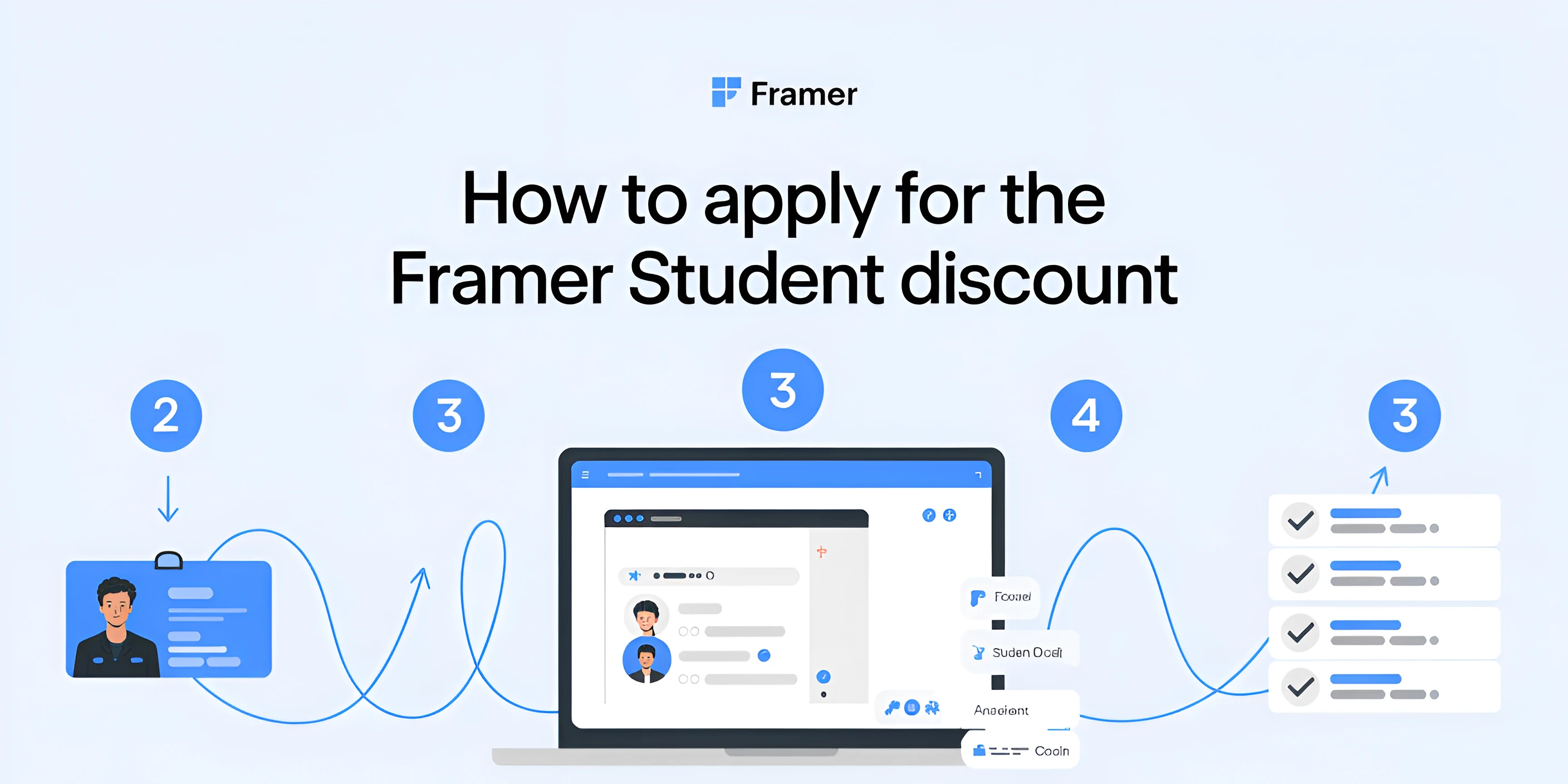
Framer student discount apply process

Applying for the Framer student plan is easy if you follow these steps carefully:

Step 1: Go to Framer’s Education Page

Visit the official Framer student page. This is the authoritative source for the program and avoids outdated third-party info.
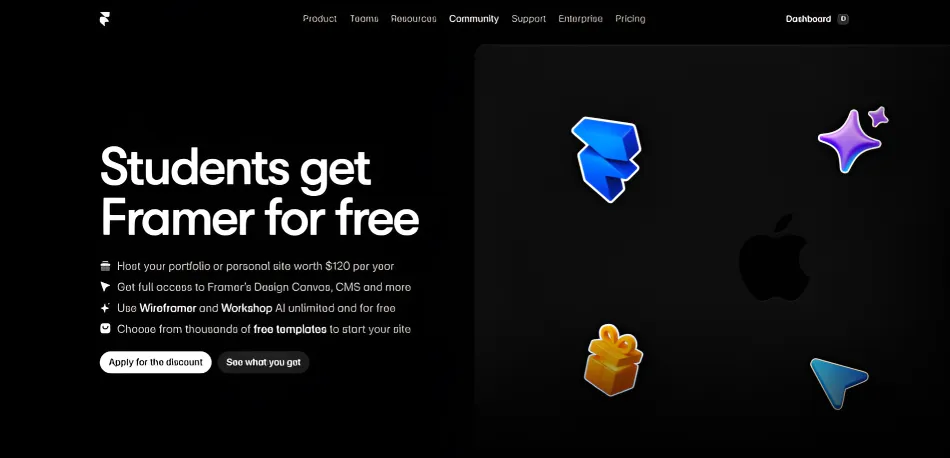
framer official student page

Step 2: Create or Log in to Your Framer Account

If you don’t have an account, sign up using your email. Use your student email if possible it speeds up verification.

Step 3: Submit Verification Documents

You’ll need to upload proof of enrollment. Framer will review your documents carefully. like:

  • Student ID card

  • Enrollment certificate

  • University-issued email address

Step 4: Wait for Approval

Approval usually takes around 5 working days. While waiting, you can still use Framer’s free tier to start exploring.

Step 5: Start Using Your Free Plan

Once approved, your account upgrades to the student Basic plan, giving full access to templates, CMS, AI tools, and hosting.

Benefits of the Framer Student Discount

The Framer student discount is more than just free access; it gives students and beginners the tools they need to learn, experiment, and build real websites without worrying about costs. Here’s why it’s so valuable:

Free Access to Professional Tools

The Framer student discount provides students with full access to Framer for free for $120 a year. This free plan offers a drag-and-drop design canvas, animation, in addition to interaction tools, CMS for design dynamic content, and AI-powered features to generate layouts, wireframes plus content. By using these professional-grade tools, learners can practice the same workflows that designers and agencies use in real projects, gaining hands-on experience while building their skills and confidence.

Build Real Portfolios

The Framer student plan can help design live websites, so you have a gorgeous portfolio to show off. Students may display projects for potential clients or employers and experiment with various templates and layouts to determine the most effective way to showcase their work. Real, live websites in a portfolio set projects on display, showing experience in building usable, professional-quality websites.

Learn Without Financial Pressure

The Framer student discount gives students access to all of the features on Framer without having to pay upfront costs. This is liberating to experiment with layouts and interactions, the whole lot, while learning production-ready web design workflows. Without the financial constraint, we can try something new or make a technical error and develop as designers in a low-stakes environment.

Access to Templates and Components

Framer student plans come with access to a library of out-of-the-box components and templates, featuring some high-quality content from Framerbite. These assets are designed to get students up and running on projects fast while also getting them acclimated to professional layouts and UI patterns. Because these templates can be personalized to their styles, students can play with design options and trends, save time, and learn about web best practices. Templates and assets additionally serve as educational resources and productivity enhancers, eliminating the need for students to repeatedly develop finished websites from scratch.

Perfect for Freelancers and Beginners

The Framer student discount is especially valuable for beginners and aspiring freelancers. It allows learners to practice creating client-ready websites, experiment with SaaS, portfolio, and agency templates, and build confidence before investing in paid plans. By working on real projects within Framer, students can develop practical skills, understand professional workflows, and prepare for freelance or client work without financial risk.

One-Year Plan with Re-Application

The Framer student plan is valid for one year, and students can reapply as long as they remain enrolled. This ensures long-term access to Framer’s professional tools while studying or learning new skills. Extended access allows learners to continue experimenting, building projects, and improving their design abilities over time, providing a consistent platform for growth throughout their academic journey.

Common Confusions and Dilemmas for Framer Student Discount

Some guides or forums claim Framer doesn’t offer a student discount. That’s outdated information. Framer’s education program is live and fully supported in 2026. Always refer to Framer’s official student page to confirm current eligibility and benefits.

Some points of confusion:

  • Do I need to pay? No. The student plan is free during approval and valid as long as you’re verified.

  • Regional limitations: Framer’s student plan is global, but verification documents must be valid in your region.

  • Old forum discussions: Users sometimes report seeing requests for payment; this happens if they try to upgrade to a paid plan instead of applying for the student plan.

Recommended Free Framer Templates for Students from Framerbite

For students learning web design, choosing the right Framer templates can make a big difference. Templates help you learn faster, build real projects, and understand how professional websites are structured. At Framerbite, there are several templates that are particularly well-suited for students, whether you’re building a portfolio, a personal site, a blog, or a project showcase. Below are some recommended Framer templates that every student should consider.

Portfolio Templates

Free Framer portfolio templates from Framerbite are ideal for students who want to showcase their work online. These templates are designed to present your projects, case studies, and creative work in an attractive and organized way. 

SaaS or Product Templates

If you're a student interested in tech and product design, SaaS or product presentation templates are excellent choices. These templates clearly showcase features, pricing, and user flows, helping you learn how professional sites organize information and communicate value, skills especially valuable for future roles in startups or tech companies. All are responsive, performance, and easy to customize without coding, ideal for building portfolios or experimenting with modern web design.

Small Business & Service Templates

Framerbite provides excellent Framer templates for local services and small businesses, with many free options. All are responsive, SEO-optimized, and no-code customizable, perfect for practicing client-focused design, building trust through layouts, and creating professional sites quickly.

Top Framerbite Template Picks for Students

If you’re a student just getting started with Framer, choosing the right template can save time and help you learn faster. Instead of feeling overwhelmed by too many options, start with these 3/5 Framerbite templates that are ideal for portfolios, blogs, and simple projects.

1. Brett: Designer Portfolio
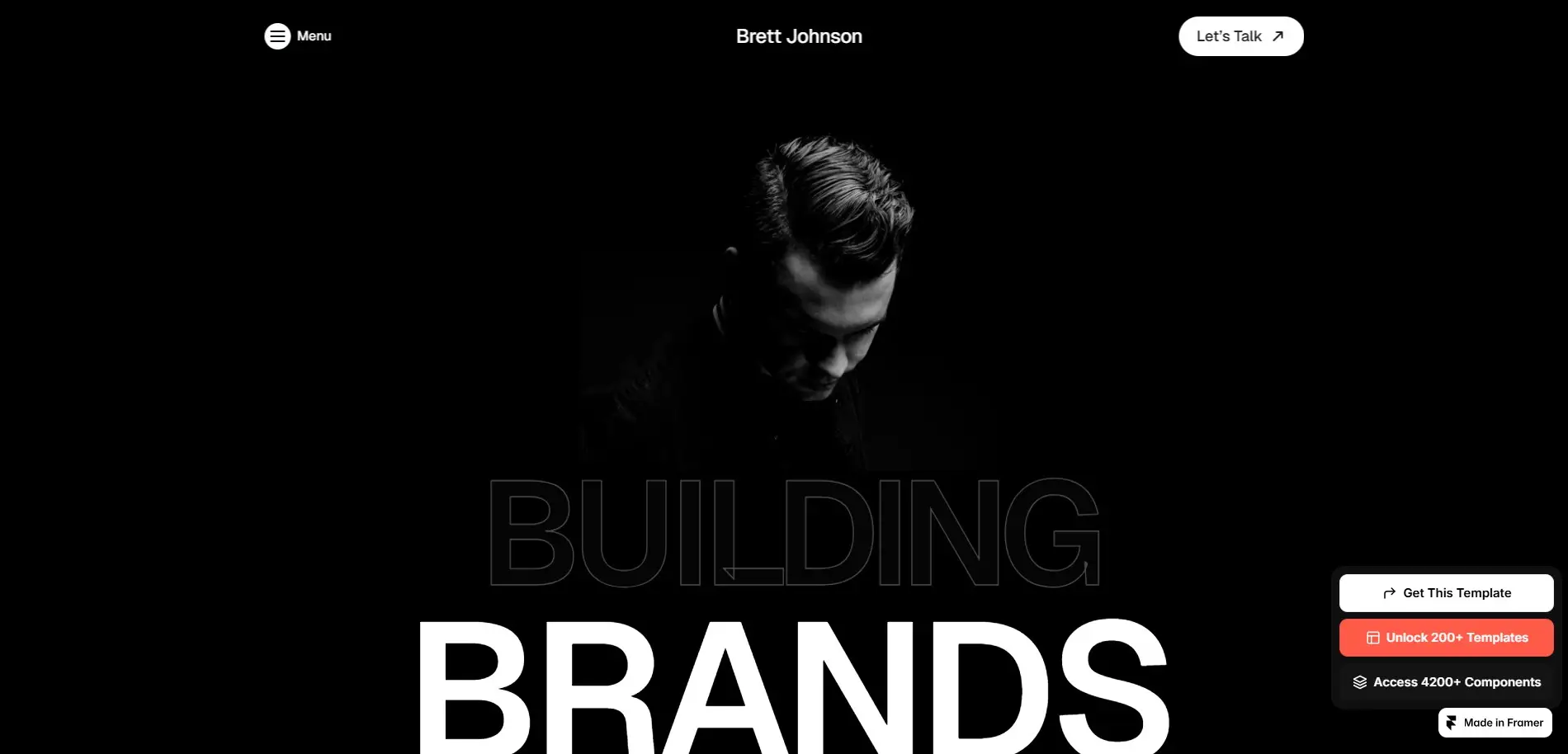
Brett designer portfolio template

Brett is one of the best Framer templates for students building a personal portfolio. It features a clean layout, clear project sections, and a responsive design, making it easy to showcase design work, case studies, or class projects. Brett helps students focus on presentation and structure without worrying about complex setup.

2. DigiBite: Modern Digital Agency Template
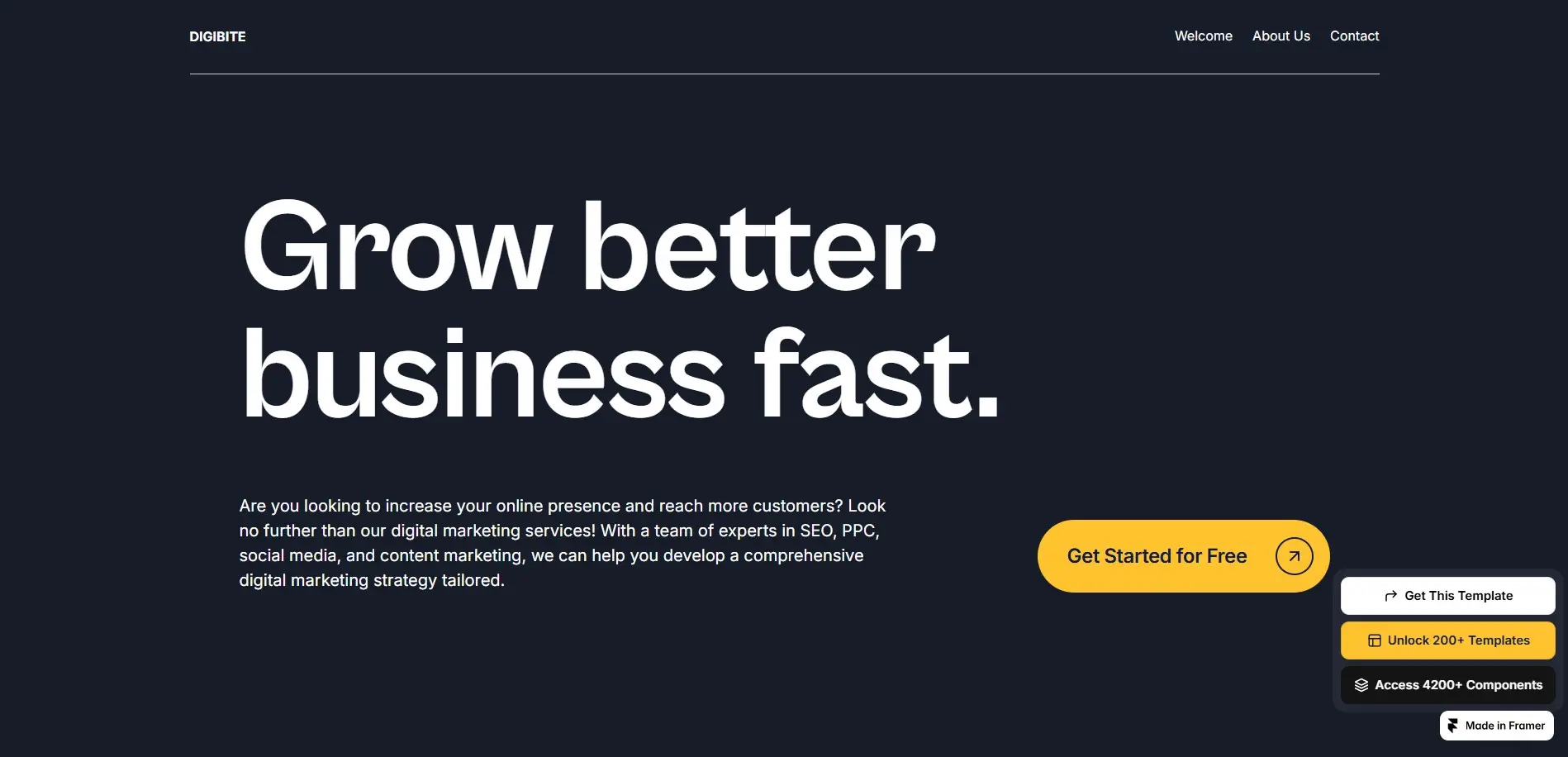
DigiBite modern digital agency template

DigiBite works perfectly as a student portfolio, even though it’s designed for agencies. It includes sections for projects, services, testimonials, and featured work, helping students understand how professional websites are structured. This template is ideal for students planning to freelance or apply for design roles.

3. Rapit: SaaS & Product Landing Template
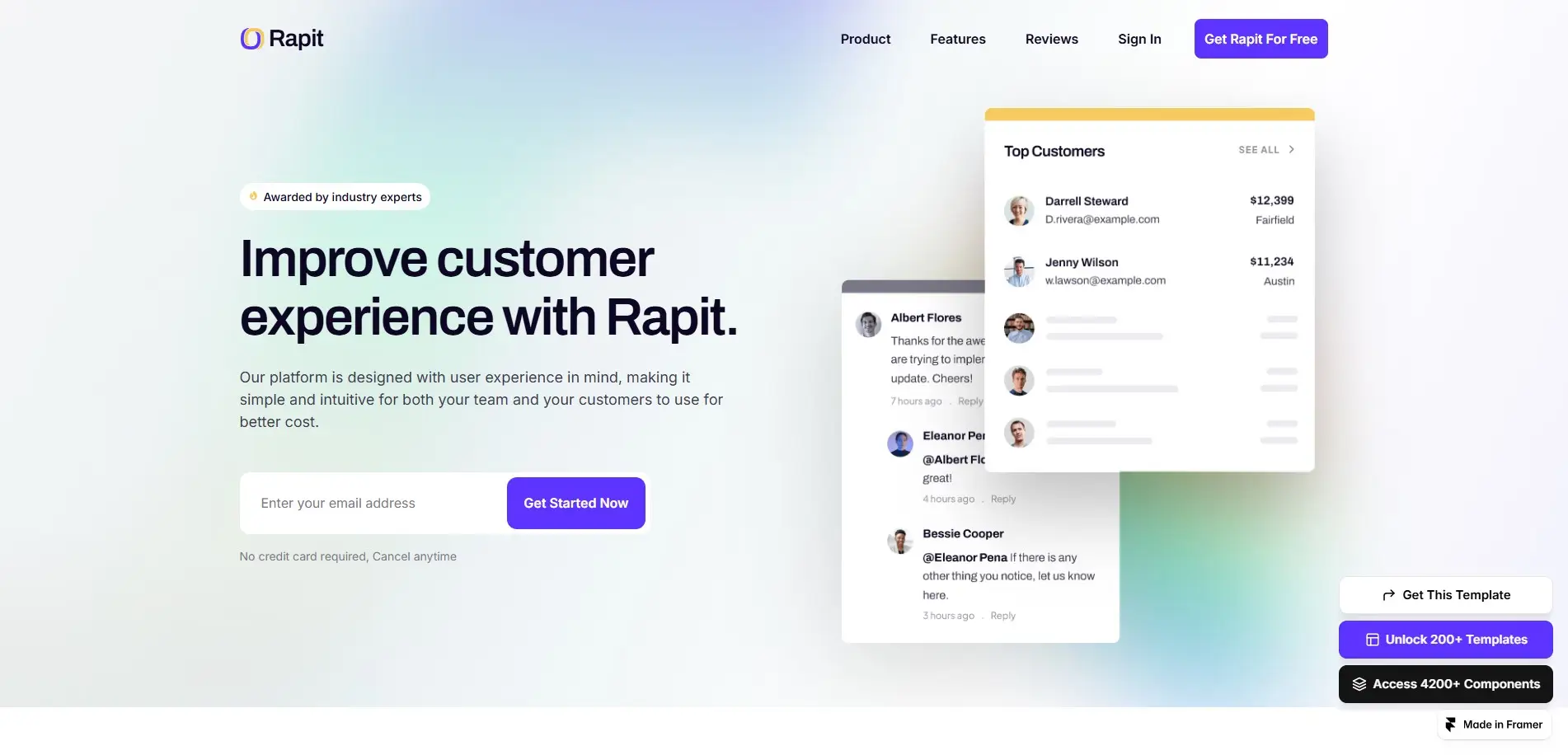
Rapit saaS product landing template

Rapit is a great choice for students interested in SaaS, startups, or product design. It teaches how to present features, benefits, and user flows clearly. Students can use Rapit for product concepts, startup ideas, or UI/UX case studies.

4. NexAI Free: AI-Focused Website Template
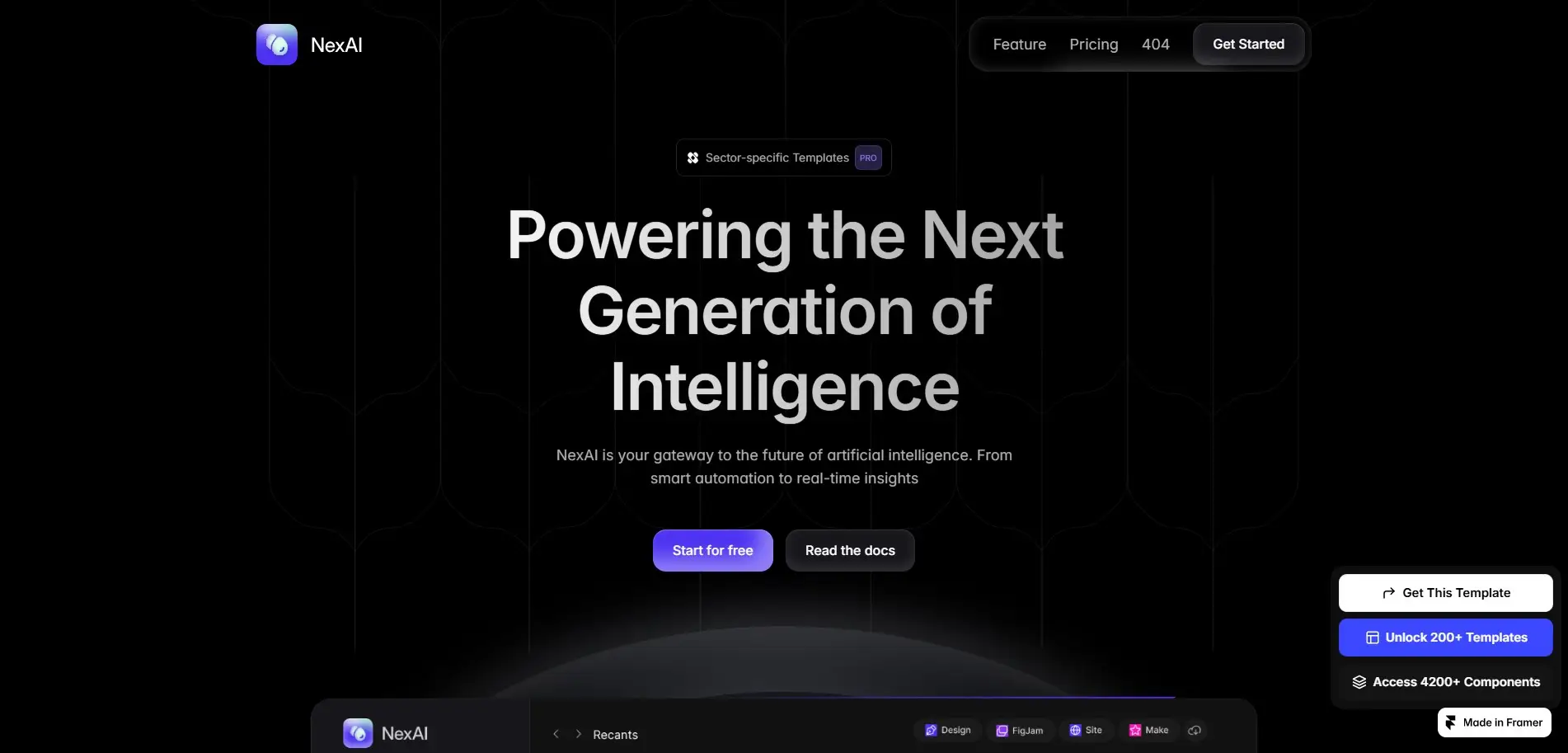
NexAI Free AI-focused website template

NexAI Free is ideal for students experimenting with AI tools or tech-related projects. Its modern layout and clear content hierarchy make it suitable for landing pages, demos, or personal AI projects while learning how modern tech websites communicate value.

5. Roofy (Free): Simple Business Website Template
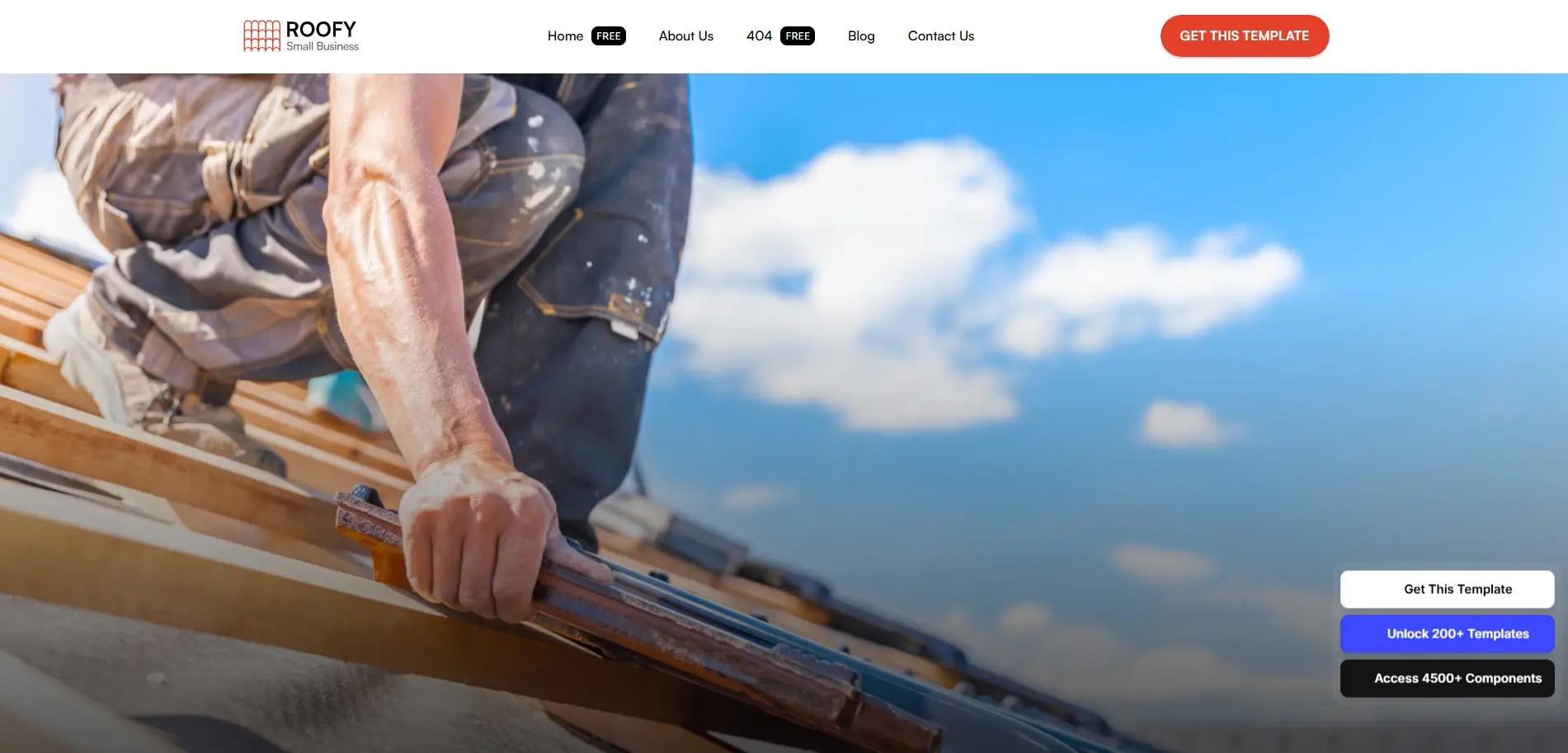
 Roofy roofing service website

Roofy is a beginner-friendly template for practicing real-world client layouts. It’s perfect for students learning how local business websites are structured, including services, contact sections, and trust elements.

More Free Framerbite Templates Students Can Use

Once you’re comfortable with the basics, Framerbite offers high-quality Framer templates perfect for this, with many free options including

  1. Avanta Lite

  2. Sharpyx

  3. CloudPeak Lite

  4. BlazeX Free

  5. Subba

  6. Trillo

  7. Constra

  8. BeClean

  9. Keylux

  10. Petopia Free

  11. CleanCut

  12. HandGrid

All are responsive, well structured, and easy to customize without coding, ideal for building portfolios or experimenting with modern web design.

Why This Free Method Works for Students

After that, exploring additional templates becomes easier and more productive. Starting with a few carefully chosen templates helps students:

  • Learn Framer faster

  • Avoid decision overload

  • Build real, usable websites

  • Understand professional layout patterns

Encourage Students to Apply and Start Building Websites for Free

There's never been a better time to dive into Framer as a student. Framer now offers the Basic plan completely free for verified students, giving you full access to powerful tools like the Design Canvas, CMS, analytics, unlimited AI features like Wireframer and Workshop, and free hosting on a Framer subdomain. This is perfect for building professional portfolios, personal sites, school projects, or experimenting with no-code design without any cost.

The application process is simple: head over to Framer's Student page and submit your student verification (usually via school email or ID). Approvals typically take about 5 working days, and you can reapply every 11 months to keep the benefits as long as you're enrolled.

In the meantime, sign up for Framer's standard free plan and start remixing high-quality templates from sites like Framerbite right away, no waiting required. Don't miss out: apply today, start building for free, and level up your design skills with professional-grade tools at zero cost.

FAQs

1. Who is eligible for the Framer Student Discount?

Students enrolled in a certified in-person or online program, such as high school, college, or university, qualify. You'll need to provide proof of enrollment during verification.

2. What exactly do I get with the Framer Student Discount?

Verified students receive the Basic plan completely free normally around $10-$15/month or $120-$180/year. This includes full access to the Design Canvas, CMS, analytics, unlimited AI tools like Wireframer and Workshop, templates, custom domain support, and free hosting, perfect for portfolios, personal sites, or school projects.

3. How long does the student discount last, and can I renew it?

The discount provides free access for up to 1 year 11 months typically. You can reapply every 11 months with fresh proof of enrollment, as long as you're still a student.

4. How do I apply for the Framer Student Discount?

Visit the official Framer for Education page, create or log into your Framer account, submit proof of enrollment (e.g., student ID, enrollment certificate, or school email), and wait for approval, usually within 5 working days. You can start building on the standard free plan while waiting.

5. What happens when I graduate or the discount ends?

Once you're no longer enrolled, the Framer free basic plan will end, and you'll revert to the standard free plan or need to upgrade to a paid tier to keep advanced features like custom domains. Reapply only if you remain a student; otherwise, explore regular plans or promotions.

Final words: Start Building for Free Today

There's no better time to get started with Framer as a student. The Basic plan is free for verified enrollees, unlocking everything you need for professional-grade sites. Apply via the official education page, get verified, and begin remixing templates from Framerbite on the free tier while you wait. Level up your skills, build stunning portfolios, and launch live projects, all at zero cost. 

So, students, don't wait, apply now and start creating.
As a student, learning design and web development is obviously exciting. But the cost of premium tools can quickly increase. That’s why Framer is one of the most useful no-code design platforms. With the Framer Student Discount, you can get access to premium design tools, templates, hosting, and CMS without paying a dime.

In this guide, we’ll break down everything you need to know: what the discount offers, who’s eligible, how to apply, tips to maximize it, and what happens when your student plan ends.

What Is the Framer Discount?

Framer discount is a method to get started with Framer's premium plans for free or at a discounted rate. Framer provides discounted plans for certain user groups, like students or educators, allowing them to have professional tools with affordable upfront expenses.

These discounts also assist beginners without the financial pressure. Students building Real portfolios designer, experimenting and growing their skills, and freelancers preparing for client work. Rather than having to fork over the full asking price, those who qualify can take out Framer at a reduced rate or even for nothing.

Framer Discount Types

Framer offers different types of discounts depending on user eligibility and usage needs.

Framer Student Discount

The Framer student discount is one of the most popular offers. Eligible students can get free access to the Framer Basic plan, which normally costs around $120 per year.

This plan includes full design tools, CMS access, free hosting, Framer AI features and access to free templates.

Education or Academic Discount

Framer also supports educators, teachers, and academic institutions. In some cases, instructors or schools can access Framer for teaching and learning purposes.

This helps teach no-code web design, create student projects, build educational websites, so it’s best to check Framer’s official program details.

Promotional or Limited-Time Discounts

Occasionally, Framer offers special promotions, like seasonal discounts, early-access offers, partner or referral-based deals

These discounts may be time-limited and are usually announced through Framer’s website or email updates.

Framer Free Plan

Framer also offers a free plan with basic features. While it has limitations, it allows users to explore the platform before upgrading.

This option is useful for testing Framer’s interface, learning basic layout and interactions, and experimenting with simple designs.

What Is the Framer Student Discount?

Framer is a popular no-code website builder that many designers use to create modern websites. To help students learn without worrying about money, Framer offers a special student discount program. With this program, students can use Framer’s Basic plan for free. The basic plan normally costs $120 per year, but eligible students don’t have to pay anything.

How to Apply for the Framer Student Discount

Framer student discount apply process

Applying for the Framer student plan is easy if you follow these steps carefully:

Step 1: Go to Framer’s Education Page

Visit the official Framer student page. This is the authoritative source for the program and avoids outdated third-party info.

framer official student page

Step 2: Create or Log in to Your Framer Account

If you don’t have an account, sign up using your email. Use your student email if possible it speeds up verification.

Step 3: Submit Verification Documents

You’ll need to upload proof of enrollment. Framer will review your documents carefully. like:

  • Student ID card

  • Enrollment certificate

  • University-issued email address

Step 4: Wait for Approval

Approval usually takes around 5 working days. While waiting, you can still use Framer’s free tier to start exploring.

Step 5: Start Using Your Free Plan

Once approved, your account upgrades to the student Basic plan, giving full access to templates, CMS, AI tools, and hosting.

Benefits of the Framer Student Discount

The Framer student discount is more than just free access; it gives students and beginners the tools they need to learn, experiment, and build real websites without worrying about costs. Here’s why it’s so valuable:

Free Access to Professional Tools

The Framer student discount provides students with full access to Framer for free for $120 a year. This free plan offers a drag-and-drop design canvas, animation, in addition to interaction tools, CMS for design dynamic content, and AI-powered features to generate layouts, wireframes plus content. By using these professional-grade tools, learners can practice the same workflows that designers and agencies use in real projects, gaining hands-on experience while building their skills and confidence.

Build Real Portfolios

The Framer student plan can help design live websites, so you have a gorgeous portfolio to show off. Students may display projects for potential clients or employers and experiment with various templates and layouts to determine the most effective way to showcase their work. Real, live websites in a portfolio set projects on display, showing experience in building usable, professional-quality websites.

Learn Without Financial Pressure

The Framer student discount gives students access to all of the features on Framer without having to pay upfront costs. This is liberating to experiment with layouts and interactions, the whole lot, while learning production-ready web design workflows. Without the financial constraint, we can try something new or make a technical error and develop as designers in a low-stakes environment.

Access to Templates and Components

Framer student plans come with access to a library of out-of-the-box components and templates, featuring some high-quality content from Framerbite. These assets are designed to get students up and running on projects fast while also getting them acclimated to professional layouts and UI patterns. Because these templates can be personalized to their styles, students can play with design options and trends, save time, and learn about web best practices. Templates and assets additionally serve as educational resources and productivity enhancers, eliminating the need for students to repeatedly develop finished websites from scratch.

Perfect for Freelancers and Beginners

The Framer student discount is especially valuable for beginners and aspiring freelancers. It allows learners to practice creating client-ready websites, experiment with SaaS, portfolio, and agency templates, and build confidence before investing in paid plans. By working on real projects within Framer, students can develop practical skills, understand professional workflows, and prepare for freelance or client work without financial risk.

One-Year Plan with Re-Application

The Framer student plan is valid for one year, and students can reapply as long as they remain enrolled. This ensures long-term access to Framer’s professional tools while studying or learning new skills. Extended access allows learners to continue experimenting, building projects, and improving their design abilities over time, providing a consistent platform for growth throughout their academic journey.

Common Confusions and Dilemmas for Framer Student Discount

Some guides or forums claim Framer doesn’t offer a student discount. That’s outdated information. Framer’s education program is live and fully supported in 2026. Always refer to Framer’s official student page to confirm current eligibility and benefits.

Some points of confusion:

  • Do I need to pay? No. The student plan is free during approval and valid as long as you’re verified.

  • Regional limitations: Framer’s student plan is global, but verification documents must be valid in your region.

  • Old forum discussions: Users sometimes report seeing requests for payment; this happens if they try to upgrade to a paid plan instead of applying for the student plan.

Recommended Free Framer Templates for Students from Framerbite

For students learning web design, choosing the right Framer templates can make a big difference. Templates help you learn faster, build real projects, and understand how professional websites are structured. At Framerbite, there are several templates that are particularly well-suited for students, whether you’re building a portfolio, a personal site, a blog, or a project showcase. Below are some recommended Framer templates that every student should consider.

Portfolio Templates

Free Framer portfolio templates from Framerbite are ideal for students who want to showcase their work online. These templates are designed to present your projects, case studies, and creative work in an attractive and organized way. 

SaaS or Product Templates

If you're a student interested in tech and product design, SaaS or product presentation templates are excellent choices. These templates clearly showcase features, pricing, and user flows, helping you learn how professional sites organize information and communicate value, skills especially valuable for future roles in startups or tech companies. All are responsive, performance, and easy to customize without coding, ideal for building portfolios or experimenting with modern web design.

Small Business & Service Templates

Framerbite provides excellent Framer templates for local services and small businesses, with many free options. All are responsive, SEO-optimized, and no-code customizable, perfect for practicing client-focused design, building trust through layouts, and creating professional sites quickly.

Top Framerbite Template Picks for Students

If you’re a student just getting started with Framer, choosing the right template can save time and help you learn faster. Instead of feeling overwhelmed by too many options, start with these 3/5 Framerbite templates that are ideal for portfolios, blogs, and simple projects.

1. Brett: Designer Portfolio

Brett designer portfolio template

Brett is one of the best Framer templates for students building a personal portfolio. It features a clean layout, clear project sections, and a responsive design, making it easy to showcase design work, case studies, or class projects. Brett helps students focus on presentation and structure without worrying about complex setup.

2. DigiBite: Modern Digital Agency Template

DigiBite modern digital agency template

DigiBite works perfectly as a student portfolio, even though it’s designed for agencies. It includes sections for projects, services, testimonials, and featured work, helping students understand how professional websites are structured. This template is ideal for students planning to freelance or apply for design roles.

3. Rapit: SaaS & Product Landing Template

Rapit saaS product landing template

Rapit is a great choice for students interested in SaaS, startups, or product design. It teaches how to present features, benefits, and user flows clearly. Students can use Rapit for product concepts, startup ideas, or UI/UX case studies.

4. NexAI Free: AI-Focused Website Template

NexAI Free AI-focused website template

NexAI Free is ideal for students experimenting with AI tools or tech-related projects. Its modern layout and clear content hierarchy make it suitable for landing pages, demos, or personal AI projects while learning how modern tech websites communicate value.

5. Roofy (Free): Simple Business Website Template

 Roofy roofing service website

Roofy is a beginner-friendly template for practicing real-world client layouts. It’s perfect for students learning how local business websites are structured, including services, contact sections, and trust elements.

More Free Framerbite Templates Students Can Use

Once you’re comfortable with the basics, Framerbite offers high-quality Framer templates perfect for this, with many free options including

  1. Avanta Lite

  2. Sharpyx

  3. CloudPeak Lite

  4. BlazeX Free

  5. Subba

  6. Trillo

  7. Constra

  8. BeClean

  9. Keylux

  10. Petopia Free

  11. CleanCut

  12. HandGrid

All are responsive, well structured, and easy to customize without coding, ideal for building portfolios or experimenting with modern web design.

Why This Free Method Works for Students

After that, exploring additional templates becomes easier and more productive. Starting with a few carefully chosen templates helps students:

  • Learn Framer faster

  • Avoid decision overload

  • Build real, usable websites

  • Understand professional layout patterns

Encourage Students to Apply and Start Building Websites for Free

There's never been a better time to dive into Framer as a student. Framer now offers the Basic plan completely free for verified students, giving you full access to powerful tools like the Design Canvas, CMS, analytics, unlimited AI features like Wireframer and Workshop, and free hosting on a Framer subdomain. This is perfect for building professional portfolios, personal sites, school projects, or experimenting with no-code design without any cost.

The application process is simple: head over to Framer's Student page and submit your student verification (usually via school email or ID). Approvals typically take about 5 working days, and you can reapply every 11 months to keep the benefits as long as you're enrolled.

In the meantime, sign up for Framer's standard free plan and start remixing high-quality templates from sites like Framerbite right away, no waiting required. Don't miss out: apply today, start building for free, and level up your design skills with professional-grade tools at zero cost.

FAQs

1. Who is eligible for the Framer Student Discount?

Students enrolled in a certified in-person or online program, such as high school, college, or university, qualify. You'll need to provide proof of enrollment during verification.

2. What exactly do I get with the Framer Student Discount?

Verified students receive the Basic plan completely free normally around $10-$15/month or $120-$180/year. This includes full access to the Design Canvas, CMS, analytics, unlimited AI tools like Wireframer and Workshop, templates, custom domain support, and free hosting, perfect for portfolios, personal sites, or school projects.

3. How long does the student discount last, and can I renew it?

The discount provides free access for up to 1 year 11 months typically. You can reapply every 11 months with fresh proof of enrollment, as long as you're still a student.

4. How do I apply for the Framer Student Discount?

Visit the official Framer for Education page, create or log into your Framer account, submit proof of enrollment (e.g., student ID, enrollment certificate, or school email), and wait for approval, usually within 5 working days. You can start building on the standard free plan while waiting.

5. What happens when I graduate or the discount ends?

Once you're no longer enrolled, the Framer free basic plan will end, and you'll revert to the standard free plan or need to upgrade to a paid tier to keep advanced features like custom domains. Reapply only if you remain a student; otherwise, explore regular plans or promotions.

Final words: Start Building for Free Today

There's no better time to get started with Framer as a student. The Basic plan is free for verified enrollees, unlocking everything you need for professional-grade sites. Apply via the official education page, get verified, and begin remixing templates from Framerbite on the free tier while you wait. Level up your skills, build stunning portfolios, and launch live projects, all at zero cost. 

So, students, don't wait, apply now and start creating.
As a student, learning design and web development is obviously exciting. But the cost of premium tools can quickly increase. That’s why Framer is one of the most useful no-code design platforms. With the Framer Student Discount, you can get access to premium design tools, templates, hosting, and CMS without paying a dime.

In this guide, we’ll break down everything you need to know: what the discount offers, who’s eligible, how to apply, tips to maximize it, and what happens when your student plan ends.

What Is the Framer Discount?

Framer discount is a method to get started with Framer's premium plans for free or at a discounted rate. Framer provides discounted plans for certain user groups, like students or educators, allowing them to have professional tools with affordable upfront expenses.

These discounts also assist beginners without the financial pressure. Students building Real portfolios designer, experimenting and growing their skills, and freelancers preparing for client work. Rather than having to fork over the full asking price, those who qualify can take out Framer at a reduced rate or even for nothing.

Framer Discount Types

Framer offers different types of discounts depending on user eligibility and usage needs.

Framer Student Discount

The Framer student discount is one of the most popular offers. Eligible students can get free access to the Framer Basic plan, which normally costs around $120 per year.

This plan includes full design tools, CMS access, free hosting, Framer AI features and access to free templates.

Education or Academic Discount

Framer also supports educators, teachers, and academic institutions. In some cases, instructors or schools can access Framer for teaching and learning purposes.

This helps teach no-code web design, create student projects, build educational websites, so it’s best to check Framer’s official program details.

Promotional or Limited-Time Discounts

Occasionally, Framer offers special promotions, like seasonal discounts, early-access offers, partner or referral-based deals

These discounts may be time-limited and are usually announced through Framer’s website or email updates.

Framer Free Plan

Framer also offers a free plan with basic features. While it has limitations, it allows users to explore the platform before upgrading.

This option is useful for testing Framer’s interface, learning basic layout and interactions, and experimenting with simple designs.

What Is the Framer Student Discount?

Framer is a popular no-code website builder that many designers use to create modern websites. To help students learn without worrying about money, Framer offers a special student discount program. With this program, students can use Framer’s Basic plan for free. The basic plan normally costs $120 per year, but eligible students don’t have to pay anything.

How to Apply for the Framer Student Discount

Framer student discount apply process

Applying for the Framer student plan is easy if you follow these steps carefully:

Step 1: Go to Framer’s Education Page

Visit the official Framer student page. This is the authoritative source for the program and avoids outdated third-party info.

framer official student page

Step 2: Create or Log in to Your Framer Account

If you don’t have an account, sign up using your email. Use your student email if possible it speeds up verification.

Step 3: Submit Verification Documents

You’ll need to upload proof of enrollment. Framer will review your documents carefully. like:

  • Student ID card

  • Enrollment certificate

  • University-issued email address

Step 4: Wait for Approval

Approval usually takes around 5 working days. While waiting, you can still use Framer’s free tier to start exploring.

Step 5: Start Using Your Free Plan

Once approved, your account upgrades to the student Basic plan, giving full access to templates, CMS, AI tools, and hosting.

Benefits of the Framer Student Discount

The Framer student discount is more than just free access; it gives students and beginners the tools they need to learn, experiment, and build real websites without worrying about costs. Here’s why it’s so valuable:

Free Access to Professional Tools

The Framer student discount provides students with full access to Framer for free for $120 a year. This free plan offers a drag-and-drop design canvas, animation, in addition to interaction tools, CMS for design dynamic content, and AI-powered features to generate layouts, wireframes plus content. By using these professional-grade tools, learners can practice the same workflows that designers and agencies use in real projects, gaining hands-on experience while building their skills and confidence.

Build Real Portfolios

The Framer student plan can help design live websites, so you have a gorgeous portfolio to show off. Students may display projects for potential clients or employers and experiment with various templates and layouts to determine the most effective way to showcase their work. Real, live websites in a portfolio set projects on display, showing experience in building usable, professional-quality websites.

Learn Without Financial Pressure

The Framer student discount gives students access to all of the features on Framer without having to pay upfront costs. This is liberating to experiment with layouts and interactions, the whole lot, while learning production-ready web design workflows. Without the financial constraint, we can try something new or make a technical error and develop as designers in a low-stakes environment.

Access to Templates and Components

Framer student plans come with access to a library of out-of-the-box components and templates, featuring some high-quality content from Framerbite. These assets are designed to get students up and running on projects fast while also getting them acclimated to professional layouts and UI patterns. Because these templates can be personalized to their styles, students can play with design options and trends, save time, and learn about web best practices. Templates and assets additionally serve as educational resources and productivity enhancers, eliminating the need for students to repeatedly develop finished websites from scratch.

Perfect for Freelancers and Beginners

The Framer student discount is especially valuable for beginners and aspiring freelancers. It allows learners to practice creating client-ready websites, experiment with SaaS, portfolio, and agency templates, and build confidence before investing in paid plans. By working on real projects within Framer, students can develop practical skills, understand professional workflows, and prepare for freelance or client work without financial risk.

One-Year Plan with Re-Application

The Framer student plan is valid for one year, and students can reapply as long as they remain enrolled. This ensures long-term access to Framer’s professional tools while studying or learning new skills. Extended access allows learners to continue experimenting, building projects, and improving their design abilities over time, providing a consistent platform for growth throughout their academic journey.

Common Confusions and Dilemmas for Framer Student Discount

Some guides or forums claim Framer doesn’t offer a student discount. That’s outdated information. Framer’s education program is live and fully supported in 2026. Always refer to Framer’s official student page to confirm current eligibility and benefits.

Some points of confusion:

  • Do I need to pay? No. The student plan is free during approval and valid as long as you’re verified.

  • Regional limitations: Framer’s student plan is global, but verification documents must be valid in your region.

  • Old forum discussions: Users sometimes report seeing requests for payment; this happens if they try to upgrade to a paid plan instead of applying for the student plan.

Recommended Free Framer Templates for Students from Framerbite

For students learning web design, choosing the right Framer templates can make a big difference. Templates help you learn faster, build real projects, and understand how professional websites are structured. At Framerbite, there are several templates that are particularly well-suited for students, whether you’re building a portfolio, a personal site, a blog, or a project showcase. Below are some recommended Framer templates that every student should consider.

Portfolio Templates

Free Framer portfolio templates from Framerbite are ideal for students who want to showcase their work online. These templates are designed to present your projects, case studies, and creative work in an attractive and organized way. 

SaaS or Product Templates

If you're a student interested in tech and product design, SaaS or product presentation templates are excellent choices. These templates clearly showcase features, pricing, and user flows, helping you learn how professional sites organize information and communicate value, skills especially valuable for future roles in startups or tech companies. All are responsive, performance, and easy to customize without coding, ideal for building portfolios or experimenting with modern web design.

Small Business & Service Templates

Framerbite provides excellent Framer templates for local services and small businesses, with many free options. All are responsive, SEO-optimized, and no-code customizable, perfect for practicing client-focused design, building trust through layouts, and creating professional sites quickly.

Top Framerbite Template Picks for Students

If you’re a student just getting started with Framer, choosing the right template can save time and help you learn faster. Instead of feeling overwhelmed by too many options, start with these 3/5 Framerbite templates that are ideal for portfolios, blogs, and simple projects.

1. Brett: Designer Portfolio

Brett designer portfolio template

Brett is one of the best Framer templates for students building a personal portfolio. It features a clean layout, clear project sections, and a responsive design, making it easy to showcase design work, case studies, or class projects. Brett helps students focus on presentation and structure without worrying about complex setup.

2. DigiBite: Modern Digital Agency Template

DigiBite modern digital agency template

DigiBite works perfectly as a student portfolio, even though it’s designed for agencies. It includes sections for projects, services, testimonials, and featured work, helping students understand how professional websites are structured. This template is ideal for students planning to freelance or apply for design roles.

3. Rapit: SaaS & Product Landing Template

Rapit saaS product landing template

Rapit is a great choice for students interested in SaaS, startups, or product design. It teaches how to present features, benefits, and user flows clearly. Students can use Rapit for product concepts, startup ideas, or UI/UX case studies.

4. NexAI Free: AI-Focused Website Template

NexAI Free AI-focused website template

NexAI Free is ideal for students experimenting with AI tools or tech-related projects. Its modern layout and clear content hierarchy make it suitable for landing pages, demos, or personal AI projects while learning how modern tech websites communicate value.

5. Roofy (Free): Simple Business Website Template

 Roofy roofing service website

Roofy is a beginner-friendly template for practicing real-world client layouts. It’s perfect for students learning how local business websites are structured, including services, contact sections, and trust elements.

More Free Framerbite Templates Students Can Use

Once you’re comfortable with the basics, Framerbite offers high-quality Framer templates perfect for this, with many free options including

  1. Avanta Lite

  2. Sharpyx

  3. CloudPeak Lite

  4. BlazeX Free

  5. Subba

  6. Trillo

  7. Constra

  8. BeClean

  9. Keylux

  10. Petopia Free

  11. CleanCut

  12. HandGrid

All are responsive, well structured, and easy to customize without coding, ideal for building portfolios or experimenting with modern web design.

Why This Free Method Works for Students

After that, exploring additional templates becomes easier and more productive. Starting with a few carefully chosen templates helps students:

  • Learn Framer faster

  • Avoid decision overload

  • Build real, usable websites

  • Understand professional layout patterns

Encourage Students to Apply and Start Building Websites for Free

There's never been a better time to dive into Framer as a student. Framer now offers the Basic plan completely free for verified students, giving you full access to powerful tools like the Design Canvas, CMS, analytics, unlimited AI features like Wireframer and Workshop, and free hosting on a Framer subdomain. This is perfect for building professional portfolios, personal sites, school projects, or experimenting with no-code design without any cost.

The application process is simple: head over to Framer's Student page and submit your student verification (usually via school email or ID). Approvals typically take about 5 working days, and you can reapply every 11 months to keep the benefits as long as you're enrolled.

In the meantime, sign up for Framer's standard free plan and start remixing high-quality templates from sites like Framerbite right away, no waiting required. Don't miss out: apply today, start building for free, and level up your design skills with professional-grade tools at zero cost.

FAQs

1. Who is eligible for the Framer Student Discount?

Students enrolled in a certified in-person or online program, such as high school, college, or university, qualify. You'll need to provide proof of enrollment during verification.

2. What exactly do I get with the Framer Student Discount?

Verified students receive the Basic plan completely free normally around $10-$15/month or $120-$180/year. This includes full access to the Design Canvas, CMS, analytics, unlimited AI tools like Wireframer and Workshop, templates, custom domain support, and free hosting, perfect for portfolios, personal sites, or school projects.

3. How long does the student discount last, and can I renew it?

The discount provides free access for up to 1 year 11 months typically. You can reapply every 11 months with fresh proof of enrollment, as long as you're still a student.

4. How do I apply for the Framer Student Discount?

Visit the official Framer for Education page, create or log into your Framer account, submit proof of enrollment (e.g., student ID, enrollment certificate, or school email), and wait for approval, usually within 5 working days. You can start building on the standard free plan while waiting.

5. What happens when I graduate or the discount ends?

Once you're no longer enrolled, the Framer free basic plan will end, and you'll revert to the standard free plan or need to upgrade to a paid tier to keep advanced features like custom domains. Reapply only if you remain a student; otherwise, explore regular plans or promotions.

Final words: Start Building for Free Today

There's no better time to get started with Framer as a student. The Basic plan is free for verified enrollees, unlocking everything you need for professional-grade sites. Apply via the official education page, get verified, and begin remixing templates from Framerbite on the free tier while you wait. Level up your skills, build stunning portfolios, and launch live projects, all at zero cost. 

So, students, don't wait, apply now and start creating.

As a student, learning design and web development is obviously exciting. But the cost of premium tools can quickly increase. That’s why Framer is one of the most useful no-code design platforms. With the Framer Student Discount, you can get access to premium design tools, templates, hosting, and CMS without paying a dime.

In this guide, we’ll break down everything you need to know: what the discount offers, who’s eligible, how to apply, tips to maximize it, and what happens when your student plan ends.

What Is the Framer Discount?

Framer discount is a method to get started with Framer's premium plans for free or at a discounted rate. Framer provides discounted plans for certain user groups, like students or educators, allowing them to have professional tools with affordable upfront expenses.

These discounts also assist beginners without the financial pressure. Students building Real portfolios designer, experimenting and growing their skills, and freelancers preparing for client work. Rather than having to fork over the full asking price, those who qualify can take out Framer at a reduced rate or even for nothing.

Framer Discount Types

Framer offers different types of discounts depending on user eligibility and usage needs.

Framer Student Discount

The Framer student discount is one of the most popular offers. Eligible students can get free access to the Framer Basic plan, which normally costs around $120 per year.

This plan includes full design tools, CMS access, free hosting, Framer AI features and access to free templates.

Education or Academic Discount

Framer also supports educators, teachers, and academic institutions. In some cases, instructors or schools can access Framer for teaching and learning purposes.

This helps teach no-code web design, create student projects, build educational websites, so it’s best to check Framer’s official program details.

Promotional or Limited-Time Discounts

Occasionally, Framer offers special promotions, like seasonal discounts, early-access offers, partner or referral-based deals

These discounts may be time-limited and are usually announced through Framer’s website or email updates.

Framer Free Plan

Framer also offers a free plan with basic features. While it has limitations, it allows users to explore the platform before upgrading.

This option is useful for testing Framer’s interface, learning basic layout and interactions, and experimenting with simple designs.

What Is the Framer Student Discount?

Framer is a popular no-code website builder that many designers use to create modern websites. To help students learn without worrying about money, Framer offers a special student discount program. With this program, students can use Framer’s Basic plan for free. The basic plan normally costs $120 per year, but eligible students don’t have to pay anything.

How to Apply for the Framer Student Discount

Framer student discount apply process

Applying for the Framer student plan is easy if you follow these steps carefully:

Step 1: Go to Framer’s Education Page

Visit the official Framer student page. This is the authoritative source for the program and avoids outdated third-party info.

framer official student page

Step 2: Create or Log in to Your Framer Account

If you don’t have an account, sign up using your email. Use your student email if possible it speeds up verification.

Step 3: Submit Verification Documents

You’ll need to upload proof of enrollment. Framer will review your documents carefully. like:

  • Student ID card

  • Enrollment certificate

  • University-issued email address

Step 4: Wait for Approval

Approval usually takes around 5 working days. While waiting, you can still use Framer’s free tier to start exploring.

Step 5: Start Using Your Free Plan

Once approved, your account upgrades to the student Basic plan, giving full access to templates, CMS, AI tools, and hosting.

Benefits of the Framer Student Discount

The Framer student discount is more than just free access; it gives students and beginners the tools they need to learn, experiment, and build real websites without worrying about costs. Here’s why it’s so valuable:

Free Access to Professional Tools

The Framer student discount provides students with full access to Framer for free for $120 a year. This free plan offers a drag-and-drop design canvas, animation, in addition to interaction tools, CMS for design dynamic content, and AI-powered features to generate layouts, wireframes plus content. By using these professional-grade tools, learners can practice the same workflows that designers and agencies use in real projects, gaining hands-on experience while building their skills and confidence.

Build Real Portfolios

The Framer student plan can help design live websites, so you have a gorgeous portfolio to show off. Students may display projects for potential clients or employers and experiment with various templates and layouts to determine the most effective way to showcase their work. Real, live websites in a portfolio set projects on display, showing experience in building usable, professional-quality websites.

Learn Without Financial Pressure

The Framer student discount gives students access to all of the features on Framer without having to pay upfront costs. This is liberating to experiment with layouts and interactions, the whole lot, while learning production-ready web design workflows. Without the financial constraint, we can try something new or make a technical error and develop as designers in a low-stakes environment.

Access to Templates and Components

Framer student plans come with access to a library of out-of-the-box components and templates, featuring some high-quality content from Framerbite. These assets are designed to get students up and running on projects fast while also getting them acclimated to professional layouts and UI patterns. Because these templates can be personalized to their styles, students can play with design options and trends, save time, and learn about web best practices. Templates and assets additionally serve as educational resources and productivity enhancers, eliminating the need for students to repeatedly develop finished websites from scratch.

Perfect for Freelancers and Beginners

The Framer student discount is especially valuable for beginners and aspiring freelancers. It allows learners to practice creating client-ready websites, experiment with SaaS, portfolio, and agency templates, and build confidence before investing in paid plans. By working on real projects within Framer, students can develop practical skills, understand professional workflows, and prepare for freelance or client work without financial risk.

One-Year Plan with Re-Application

The Framer student plan is valid for one year, and students can reapply as long as they remain enrolled. This ensures long-term access to Framer’s professional tools while studying or learning new skills. Extended access allows learners to continue experimenting, building projects, and improving their design abilities over time, providing a consistent platform for growth throughout their academic journey.

Common Confusions and Dilemmas for Framer Student Discount

Some guides or forums claim Framer doesn’t offer a student discount. That’s outdated information. Framer’s education program is live and fully supported in 2026. Always refer to Framer’s official student page to confirm current eligibility and benefits.

Some points of confusion:

  • Do I need to pay? No. The student plan is free during approval and valid as long as you’re verified.

  • Regional limitations: Framer’s student plan is global, but verification documents must be valid in your region.

  • Old forum discussions: Users sometimes report seeing requests for payment; this happens if they try to upgrade to a paid plan instead of applying for the student plan.

Recommended Free Framer Templates for Students from Framerbite

For students learning web design, choosing the right Framer templates can make a big difference. Templates help you learn faster, build real projects, and understand how professional websites are structured. At Framerbite, there are several templates that are particularly well-suited for students, whether you’re building a portfolio, a personal site, a blog, or a project showcase. Below are some recommended Framer templates that every student should consider.

Portfolio Templates

Free Framer portfolio templates from Framerbite are ideal for students who want to showcase their work online. These templates are designed to present your projects, case studies, and creative work in an attractive and organized way. 

SaaS or Product Templates

If you're a student interested in tech and product design, SaaS or product presentation templates are excellent choices. These templates clearly showcase features, pricing, and user flows, helping you learn how professional sites organize information and communicate value, skills especially valuable for future roles in startups or tech companies. All are responsive, performance, and easy to customize without coding, ideal for building portfolios or experimenting with modern web design.

Small Business & Service Templates

Framerbite provides excellent Framer templates for local services and small businesses, with many free options. All are responsive, SEO-optimized, and no-code customizable, perfect for practicing client-focused design, building trust through layouts, and creating professional sites quickly.

Top Framerbite Template Picks for Students

If you’re a student just getting started with Framer, choosing the right template can save time and help you learn faster. Instead of feeling overwhelmed by too many options, start with these 3/5 Framerbite templates that are ideal for portfolios, blogs, and simple projects.

1. Brett: Designer Portfolio

Brett designer portfolio template

Brett is one of the best Framer templates for students building a personal portfolio. It features a clean layout, clear project sections, and a responsive design, making it easy to showcase design work, case studies, or class projects. Brett helps students focus on presentation and structure without worrying about complex setup.

2. DigiBite: Modern Digital Agency Template

DigiBite modern digital agency template

DigiBite works perfectly as a student portfolio, even though it’s designed for agencies. It includes sections for projects, services, testimonials, and featured work, helping students understand how professional websites are structured. This template is ideal for students planning to freelance or apply for design roles.

3. Rapit: SaaS & Product Landing Template

Rapit saaS product landing template

Rapit is a great choice for students interested in SaaS, startups, or product design. It teaches how to present features, benefits, and user flows clearly. Students can use Rapit for product concepts, startup ideas, or UI/UX case studies.

4. NexAI Free: AI-Focused Website Template

NexAI Free AI-focused website template

NexAI Free is ideal for students experimenting with AI tools or tech-related projects. Its modern layout and clear content hierarchy make it suitable for landing pages, demos, or personal AI projects while learning how modern tech websites communicate value.

5. Roofy (Free): Simple Business Website Template

 Roofy roofing service website

Roofy is a beginner-friendly template for practicing real-world client layouts. It’s perfect for students learning how local business websites are structured, including services, contact sections, and trust elements.

More Free Framerbite Templates Students Can Use

Once you’re comfortable with the basics, Framerbite offers high-quality Framer templates perfect for this, with many free options including

  1. Avanta Lite

  2. Sharpyx

  3. CloudPeak Lite

  4. BlazeX Free

  5. Subba

  6. Trillo

  7. Constra

  8. BeClean

  9. Keylux

  10. Petopia Free

  11. CleanCut

  12. HandGrid

All are responsive, well structured, and easy to customize without coding, ideal for building portfolios or experimenting with modern web design.

Why This Free Method Works for Students

After that, exploring additional templates becomes easier and more productive. Starting with a few carefully chosen templates helps students:

  • Learn Framer faster

  • Avoid decision overload

  • Build real, usable websites

  • Understand professional layout patterns

Encourage Students to Apply and Start Building Websites for Free

There's never been a better time to dive into Framer as a student. Framer now offers the Basic plan completely free for verified students, giving you full access to powerful tools like the Design Canvas, CMS, analytics, unlimited AI features like Wireframer and Workshop, and free hosting on a Framer subdomain. This is perfect for building professional portfolios, personal sites, school projects, or experimenting with no-code design without any cost.

The application process is simple: head over to Framer's Student page and submit your student verification (usually via school email or ID). Approvals typically take about 5 working days, and you can reapply every 11 months to keep the benefits as long as you're enrolled.

In the meantime, sign up for Framer's standard free plan and start remixing high-quality templates from sites like Framerbite right away, no waiting required. Don't miss out: apply today, start building for free, and level up your design skills with professional-grade tools at zero cost.

FAQs

1. Who is eligible for the Framer Student Discount?

Students enrolled in a certified in-person or online program, such as high school, college, or university, qualify. You'll need to provide proof of enrollment during verification.

2. What exactly do I get with the Framer Student Discount?

Verified students receive the Basic plan completely free normally around $10-$15/month or $120-$180/year. This includes full access to the Design Canvas, CMS, analytics, unlimited AI tools like Wireframer and Workshop, templates, custom domain support, and free hosting, perfect for portfolios, personal sites, or school projects.

3. How long does the student discount last, and can I renew it?

The discount provides free access for up to 1 year 11 months typically. You can reapply every 11 months with fresh proof of enrollment, as long as you're still a student.

4. How do I apply for the Framer Student Discount?

Visit the official Framer for Education page, create or log into your Framer account, submit proof of enrollment (e.g., student ID, enrollment certificate, or school email), and wait for approval, usually within 5 working days. You can start building on the standard free plan while waiting.

5. What happens when I graduate or the discount ends?

Once you're no longer enrolled, the Framer free basic plan will end, and you'll revert to the standard free plan or need to upgrade to a paid tier to keep advanced features like custom domains. Reapply only if you remain a student; otherwise, explore regular plans or promotions.

Final words: Start Building for Free Today

There's no better time to get started with Framer as a student. The Basic plan is free for verified enrollees, unlocking everything you need for professional-grade sites. Apply via the official education page, get verified, and begin remixing templates from Framerbite on the free tier while you wait. Level up your skills, build stunning portfolios, and launch live projects, all at zero cost. 

So, students, don't wait, apply now and start creating.